Back Up and Recovery Testing

Backup and recovery testing are critical to ensuring data integrity and business continuity for critical computerized systems. They are also a hard regulatory requirement in our computer system lifecycle.

Part 11 (21 CFR 11.10 and 11.30) requires that:
“For the availability of computerized systems supporting critical processes, provisions should be made to ensure continuity of the systems in the event of an incident or system failure. This includes implementing adequate backup and recovery measures, as well as providing sufficient system redundancy and failover mechanisms.”

Part 11 also requires that “The backup and recovery processes must be validated in order to ensure that they operate in an effective and reliable manner.”

Similarly, Annex 11 requires that backup and recovery processes be validated to ensure they operate reliably and effectively. Annex 11 also requires that the validation process be documented and includes a risk assessment of the system’s critical processes.

Similar requirements can be found across the GxP data integrity requirements.

The regulatory requirements require that backup and recovery processes be validated to ensure they can reliably recover the system in case of an incident or failure. This validation process must be documented, including a risk assessment of the system’s critical processes.

Backup and recovery testing:

  1. Verifies Backup Integrity: Testing backups lets you verify that the backup data is complete, accurate, and not corrupted. It ensures that the backed-up data can be reliably restored when needed, maintaining the integrity of the original data.
  2. Validates Recovery Procedures: Regularly testing the recovery process helps identify and resolve any issues or gaps in the recovery procedures. This ensures that the data can be restored wholly and correctly, preserving its integrity during recovery.
  3. Identifies Data Corruption: Testing can reveal data corruption that may have gone unnoticed. By restoring backups and comparing them with the original data, you can detect and address any data integrity issues before they become critical.
  4. Improves Disaster Preparedness: Regular backup and recovery testing helps organizations identify and address potential issues before a disaster strikes. This improves the organization’s preparedness and ability to recover data with integrity in a disaster or data loss incident.
  5. Maintains Business Continuity: Backup and recovery testing helps maintain business continuity by ensuring that backups are reliable and recovery procedures are adequate. Organizations can minimize downtime and data loss, ensuring the integrity of critical business data and operations.

To maintain data integrity, it is recommended that backup and recovery testing be performed regularly. This should follow industry best practices and adhere to the organization’s recovery time objectives (RTOs) and recovery point objectives (RPOs). Testing should cover various scenarios, including full system restores, partial data restores, and data validation checks.

LevelDescriptionKey ActivitiesFrequency
Backup TestsEnsures data is backed up correctly and consistently.– Check backup infrastructure health
– Verify data consistency
– Ensure all critical data is covered
– Check security settings
Regularly (daily, weekly, monthly)
Recovery TestsEnsures data can be restored effectively and within required timeframes.– Test recovery time and point objectives (RTO and RPO)
– Define and test various recovery scopes
– Schedule tests to avoid business disruption
– Document all tests and results
Regularly (quarterly, biannually, annually)
Disaster Recovery TestsEnsures the disaster recovery plan is effective and feasible.– Perform disaster recovery scenarios
– Test failover and failback operations
– Coordinate with all relevant teams and stakeholders
Less frequent (once or twice a year)

By incorporating backup and recovery testing into the data lifecycle, organizations can have confidence in their ability to recover data with integrity, minimizing the risk of data loss or corruption and ensuring business continuity in the face of disasters or data loss incidents.

AspectBackup TestsRecovery Tests
ObjectiveVerify data integrity and backup processesEnsure data and systems can be successfully restored
FocusData backup and storageComprehensive recovery of data, applications, and infrastructure
ProcessesData copy verification, consistency checks, storage verificationFull system restore, spot-checking, disaster simulation
ScopeData-focusedBroader scope including systems and infrastructure
FrequencyRegular intervals (daily, weekly, monthly)Less frequent but more thorough
Testing AreasBackup scheduling, data transfer, storage capacityRecovery time objectives (RTO), recovery point objectives (RPO), failover/failback
ValidationBackup data is complete and accessibleRestored data and systems are fully functional

Building a Part 11/Annex 11 Course

I have realized I need to build a Part 11 and Annex 11 course. I’ve evaluated some external offerings and decided they really lack that applicability layer, which I am going to focus on.

Here are my draft learning objectives.

21 CFR Part 11 Learning Objectives

  1. Understanding Regulatory Focus: Understand the current regulatory focus on data integrity and relevant regulatory observations.
  2. FDA Requirements: Learn the detailed requirements within Part 11 for electronic records, electronic signatures, and open systems.
  3. Implementation: Understand how to implement the principles of 21 CFR Part 11 in both computer hardware and software systems used in manufacturing, QA, regulatory, and process control.
  4. Compliance: Learn to meet the 21 CFR Part 11 requirements, including the USFDA interpretation in the Scope and Application Guidance.
  5. Risk Management: Apply the current industry risk-based good practice approach to compliant electronic records and signatures.
  6. Practical Examples: Review practical examples covering the implementation of FDA requirements.
  7. Data Integrity: Understand the need for data integrity throughout the system and data life cycles and how to maintain it.
  8. Cloud Computing and Mobile Applications: Learn approaches to cloud computing and mobile applications in the GxP environment.

EMA Annex 11 Learning Objectives

  1. General Guidance: Understand the general guidance on managing risks, personnel responsibilities, and working with third-party suppliers and service providers.
  2. Validation: Learn best practices for validation and what should be included in validation documentation.
  3. Operational Phase: During the operational phase, gain knowledge on data management, security, and risk minimization for computerized systems.
  4. Electronic Signatures: Understand the requirements for electronic signatures and how they should be permanently linked to the respective record, including time and date.
  5. Audit Trails: Learn about the implementation and review of audit trails to ensure data integrity.
  6. Security Access: Understand the requirements for security access to protect electronic records and electronic signatures.
  7. Data Governance: Evaluate the requirements for a robust data governance system.
  8. Compliance with EU Regulations: Learn how to align with Annex 11 to ensure compliance with related EU regulations.

Course Outline: 21 CFR Part 11 and EMA Annex 11 for IT Professionals

Module 1: Introduction and Regulatory Overview

  • History and background of 21 CFR Part 11 and EMA Annex 11
  • Purpose and scope of the regulations
  • Applicability to electronic records and electronic signatures
  • Regulatory bodies and enforcement

Module 2: 21 CFR Part 11 Requirements

  • Subpart A: General Provisions
  • Definitions of key terms
  • Implementation and scope
  • Subpart B: Electronic Records
  • Controls for closed and open systems
  • Audit trails
  • Operational and device checks
  • Authority checks
  • Record retention and availability
  • Subpart C: Electronic Signatures
  • General requirements
  • Electronic signature components and controls
  • Identification codes and passwords

Module 3: EMA Annex 11 Requirements

  • General requirements
  • Risk management
  • Personnel roles and responsibilities
  • Suppliers and service providers
  • Project phase
  • User requirements and specifications
  • System design and development
  • System validation
  • Testing and release management
  • Operational phase
  • Data governance and integrity
  • Audit trails and change control
  • Periodic evaluations
  • Security measures
  • Electronic signatures
  • Business continuity planning

Module 4: PIC/S Data Integrity Requirements

  • Data Governance System
    • Structure and control of the Quality Management System (QMS)
    • Policies related to organizational values, quality, staff conduct, and ethics
  • Organizational Influences
    • Roles and responsibilities for data integrity
    • Training and awareness programs
  • General Data Integrity Principles
    • ALCOA+ principles (Attributable, Legible, Contemporaneous, Original, Accurate, Complete, Consistent, Enduring, and Available)
    • Data lifecycle management
  • Specific Considerations for Computerized Systems
    • Qualification and validation of computerized systems
    • System security and access controls
    • Audit trails and data review
    • Management of hybrid systems
  • Outsourced Activities
    • Data integrity considerations for third-party suppliers
    • Contractual agreements and oversight
  • Regulatory Actions and Remediation
    • Responding to data integrity issues
    • Remediation strategies and corrective actions
  • Periodic System Evaluation
    • Regular reviews and re-validation
    • Risk-based approach to system updates and maintenance

Module 5: Compliance Strategies and Best Practices

  • Interpreting regulatory guidance documents
  • Conducting risk assessments
  • Our validation approach
  • Leveraging suppliers and third-party service providers
  • Implementing audit trails and electronic signatures
  • Data integrity and security controls
  • Change and configuration management
  • Training and documentation requirements

Module 6: Case Studies and Industry Examples

  • Review of FDA warning letters and 483 observations
  • Lessons learned from industry compliance initiatives
  • Practical examples of system validation and audits

Module 7: Future Trends and Developments

  • Regulatory updates and revisions
  • Impact of new technologies (AI, cloud, etc.)
  • Harmonization efforts between global regulations
  • Continuous compliance monitoring

The course will include interactive elements such as hands-on exercises, quizzes, and group discussions to reinforce the learning objectives. The course will provide practical insights for IT professionals by focusing on real-world examples from our company.

The Audit Trail and Data Integrity

Requirement

Description

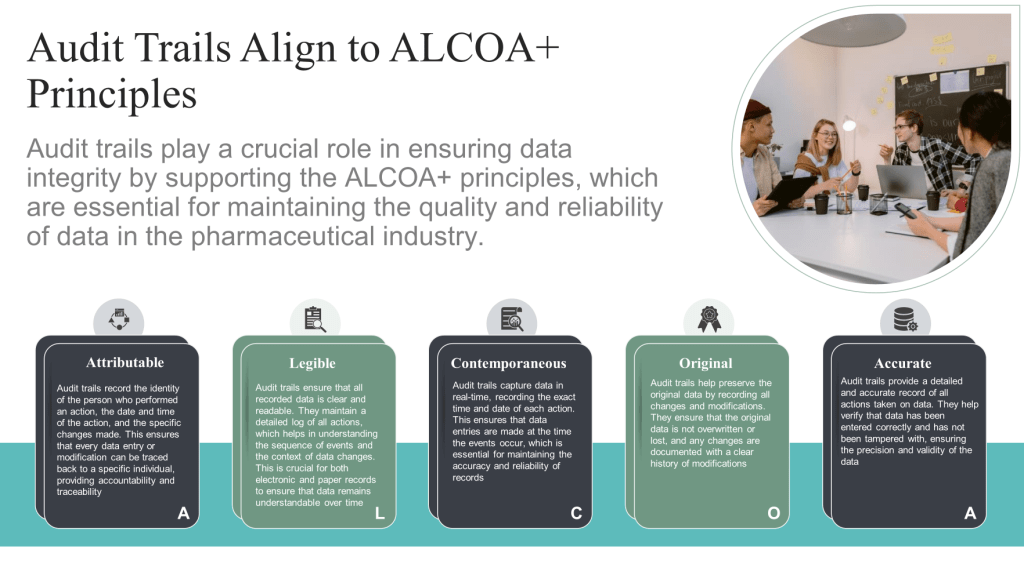
Attributable (Traceable)

  • Each audit trail entry must be attributable to the individual responsible for the direct data input so all changes or creation of data with the persons making those changes. When using a user’s unique ID, this must identify an individual pers on.
  • Each audit trail must be linked to the relevant record throughout the data life cycle.

Legible

  • The system should be able to print or provide an electronic copy of the audit trail.
  • The audit trail must be available in a meaningful format when. viewed in the system or as hardcopy.

Contemporaneous

  • Each audit trail entry must be date- and time-stamped according to a controlled clock which cannot be altered. The time should either be based on central server time or a local time, so long as it is clear in which time zone the entry was performed.

Original

  • The audit trail should retain the dynamic functionalities found in the computerized system, included search functionality to facilitate audit trail review activities.

Accurate

  • Audit trail functionality must be verified to ensure the data written to the audit trail equals the data entered or system generated.
  • Audit trail data must be stored in a secure manner and users cannot have the ability to amend, delete, or switch off the audit trail. Where a system administrator amends, or switches off the audit trail, a record of that action must be retained.

Complete

  • The audit trail entries must be automatically captured by the computerized system whenever an electronic record is created, modified, or deleted.
  • Audit trails, at minimum, must record all end user initiated processes related to critical data. The following parameters must be included:
    • The identity of the person performing the action.
    • In the case of a change or deletion, the detail of the change or deletion, and a record of the original entry.
    • The reason for any GxP change or deletion.
    • The time and date when the action was performed.

Consistent

  • Audit trails are used to review, detect, report, and address data integrity issues.
  • Audit trail reviewers must have appropriate training, system knowledge and knowledge of the process to perform the audit trail review. The review of the relevant audit trails must be documented.
  • Audit trail discrepancies must be addressed, investigated, and escalated to JEB management and national authorities, as necessary.

Enduring

  • The audit trail must be retained for the same duration as the associated electronic record.

Available

  • The audit trail must be available for review at any time by inspectors and auditors during the required retention period.
  • The audit trail must be accessible in a human readable format.

21CFR Part 11 Requirements

Definition: An audit trail is a secure, computer-generated, time-stamped electronic record that allows for the reconstruction of events related to the creation, modification, and deletion of an electronic record.

Requirements:

  • Availability: Audit trails must be easily accessible for review and copying by the FDA during inspections.
  • Automation: Entries must be automatically captured by the system without manual intervention.
  • Components: Each entry must include a timestamp, user ID, original and new values, and reasons for changes where applicable.
  • Security: Audit trail data must be securely stored and not accessible for editing by users

EMA Annex 11 (Eudralex Volume 4) Requirements

Definition: Audit trails are records of all GMP-relevant changes and deletions, created by the system to ensure traceability and accountability.

Requirements:

  • Risk-Based Approach: Building audit trails into the system for all GMP-relevant changes and deletions should be considered based on a risk assessment.
  • Documentation: The reasons for changes or deletions must be documented.
  • Review: Audit trails must be available, convertible into a generally readable form, and regularly reviewed.
  • Validation: The audit trail functionality must be validated to ensure it captures all necessary data accurately and securely.

Requirements from PIC/S GMP Data Integrity Guidance

Definition: Audit trails are metadata recorded about critical information such as changes or deletions of GMP/GDP relevant data to enable the reconstruction of activities.

Requirements:

  • Review: Critical audit trails related to each operation should be independently reviewed with all other records related to the operation, especially before batch release.
  • Documentation: Significant deviations found during the audit trail review must be fully investigated and documented.