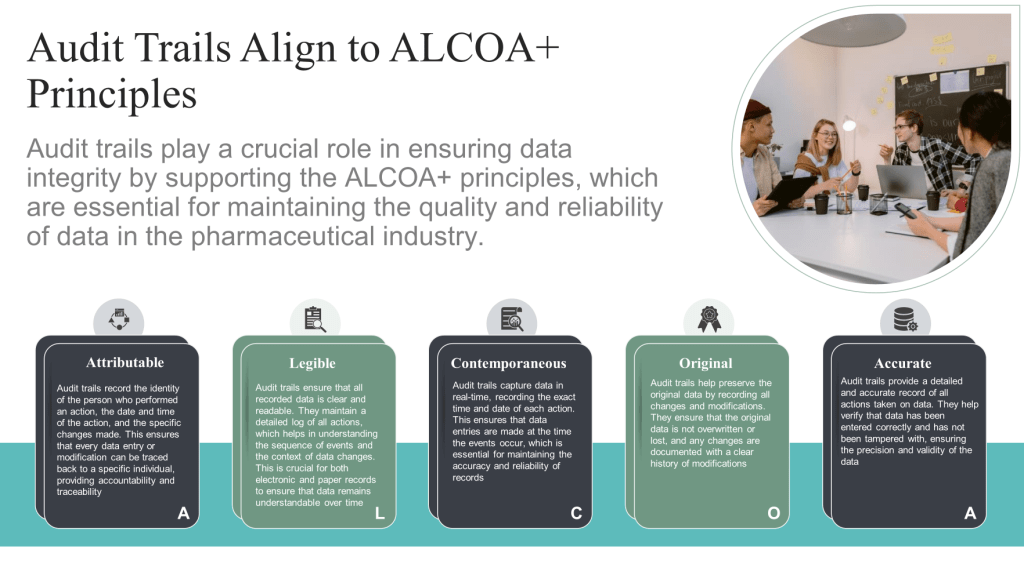
Each audit trail entry must
be attributable to the individual responsible for the direct data input so
all changes or creation of data with the persons making those changes.
When using a user’s unique ID, this must identify an individual pers
on.
Each audit trail must be
linked to the relevant record throughout the data life cycle.
Legible
The system should be able
to print or provide an electronic copy of the audit trail.
The audit trail must be
available in a meaningful format when. viewed in the system or as
hardcopy.
Contemporaneous
Each audit trail entry must
be date- and time-stamped according to a controlled clock which cannot
be altered. The time should either be based on central server time or a
local time, so long as it is clear in which time zone the entry was
performed.
Original
The audit trail should
retain the dynamic functionalities found in the computerized system,
included search functionality to facilitate audit trail review
activities.
Accurate
Audit trail functionality
must be verified to ensure the data written to the audit trail equals
the data entered or system generated.
Audit trail data must be
stored in a secure manner and users cannot have the ability to amend,
delete, or switch off the audit trail. Where a system administrator
amends, or switches off the audit trail, a record of that action must be
retained.
Complete
The audit trail entries
must be automatically captured by the computerized system whenever an
electronic record is created, modified, or deleted.
Audit trails, at minimum,
must record all end user initiated processes
related to critical data. The following parameters must be included:
The identity of the person
performing the action.
In the case of a change or
deletion, the detail of the change or deletion, and a record of the
original entry.
The reason for any GxP change or deletion.
The time and date when the
action was performed.
Consistent
Audit trails are used to
review, detect, report, and address data integrity issues.
Audit trail reviewers must
have appropriate training, system knowledge and knowledge of the process
to perform the audit trail review. The review of the relevant audit
trails must be documented.
Audit trail discrepancies
must be addressed, investigated, and escalated to JEB management and
national authorities, as necessary.
Enduring
The audit trail must be
retained for the same duration as the associated electronic record.
Available
The audit trail must be
available for review at any time by inspectors and auditors during the
required retention period.
The audit trail must be
accessible in a human readable format.
21CFR Part 11 Requirements
Definition: An audit trail is a secure, computer-generated, time-stamped electronic record that allows for the reconstruction of events related to the creation, modification, and deletion of an electronic record.
Requirements:
Availability: Audit trails must be easily accessible for review and copying by the FDA during inspections.
Automation: Entries must be automatically captured by the system without manual intervention.
Components: Each entry must include a timestamp, user ID, original and new values, and reasons for changes where applicable.
Security: Audit trail data must be securely stored and not accessible for editing by users
EMA Annex 11 (Eudralex Volume 4) Requirements
Definition: Audit trails are records of all GMP-relevant changes and deletions, created by the system to ensure traceability and accountability.
Requirements:
Risk-Based Approach: Building audit trails into the system for all GMP-relevant changes and deletions should be considered based on a risk assessment.
Documentation: The reasons for changes or deletions must be documented.
Review: Audit trails must be available, convertible into a generally readable form, and regularly reviewed.
Validation: The audit trail functionality must be validated to ensure it captures all necessary data accurately and securely.
Requirements from PIC/S GMP Data Integrity Guidance
Definition: Audit trails are metadata recorded about critical information such as changes or deletions of GMP/GDP relevant data to enable the reconstruction of activities.
Requirements:
Review: Critical audit trails related to each operation should be independently reviewed with all other records related to the operation, especially before batch release.
Documentation: Significant deviations found during the audit trail review must be fully investigated and documented.
I have them, you have them, and chances are they are used in more ways than you know. The spreadsheet is a powerful tool and really ubiquitous. As such, spreadsheets are used in many ways in the GxP environment, which means they need to meet their intended use and be appropriately controlled. Spreadsheets must perform accurately and consistently, maintain data integrity, and comply with regulatory standards such as health agency guidelines and the GxPs.
That said, it can also be really easy to over-control spreadsheets. It is important to recognize that there is no one-size-fits-all approach.
It is important to build a risk-based approach from a clear definition of the scope and purpose of an individual spreadsheet. This includes identifying the intended use, the type of data a spreadsheet will handle, and the specific calculations or data manipulations it will perform.
I recommend an approach that breaks the spreadsheet down into three major categories. This should also apply to similar tools, such as Jira, Smartsheet, or what-have-you.
Spreadsheet Functionality
Level of verification
Used like typewriters or simple calculators. They are intended to produce an approved document. Signatories should make any calculations or formulas visible or explicitly describe them and verify that they are correct. The paper printout or electronic version, managed through an electronic document management system, is the GxP record.
Control with appropriate procedural governance. The final output may be retained as a record or have an appropriate checked-by-step in another document.
A low level of complexity (few or no conditional statements, smaller number of cells) and do not use Visual Basic Application programs, macros, automation, or other forms of code.
Control through the document lifecycle. Each use is a record.
A high level of complexity (many conditional statements, external calls or writing to an external database, or linked to other spreadsheets, larger number of cells), using Visual Basic Application, macros, or automation, and multiple users and departments.
Treat under a GAMP5 approach for configuration or even customization (Category 4 or 5)
Requirements by Spreadsheet complexity
For spreadsheets, the GxP risk classification and GxP functional risk assessment should be performed to include both the spreadsheet functionality and the associated infrastructure components, as applicable (e.g., network drive/storage location).
For qualification, there should be a succinct template to drive activities. This should address the following parts.
1. Scope and Purpose
The validation process begins with a clear definition of the spreadsheet’s scope and purpose. This includes identifying its intended use, the type of data it will handle, and the specific calculations or data manipulations it will perform.
2. User Requirements and Functional Specifications
Develop detailed user requirements and functional specifications by outlining what the spreadsheet must do, ensuring that it meets all user needs and regulatory requirements. This step specifies the data inputs, outputs, formulas, and any macros or other automation the spreadsheet will utilize.
3. Design Qualification
Ensure that the spreadsheet design aligns with the user requirements and functional specifications. This includes setting up the spreadsheet layout, formulas, and any macros or scripts. The design should prevent common errors such as incorrect data entry and formula misapplication.
4. Risk Assessment
Conduct a risk assessment to identify and evaluate potential risks associated with the spreadsheet. This includes assessing the impact of spreadsheet errors on the final results and determining the likelihood of such errors occurring. Mitigation strategies should be developed for identified risks.
5. Data Integrity and Security
Implement measures to ensure data integrity and security. This includes setting up access controls, using data validation features to limit data entry errors, and ensuring that data storage and handling comply with regulatory requirements.
6. Testing (IQ, OQ, PQ)
IQ tests the proper installation and configuration of the spreadsheet.
OQ ensures the spreadsheet operates as designed under specified conditions.
PQ verifies that the spreadsheet consistently produces correct outputs under real-world conditions.
Remember, all one template; don’t get into multiple documents that each regurgitate all the same stuff.
Lifecycle Approach
Spreadsheets should have appropriate procedural guidance and training.
I recently ran into a scenario where password manager apps are used as solutions (?) in generating complex passwords and to keep login information private and secure. I am wondering what your thoughts on the use of apps to store and auto fill passwords to GxP system, especially with respect to access restriction requirements and data integrity. Any validation requirements, etc?
Asked by a colleague
Passwords are horrible, with numerous problems, both from a security and a usability standpoint. Companies often talk about vulnerabilities, external (like phishing) and internal (like fraud), but there are a host of issues from the user’s end. Often, users have to create dozens of passwords for different accounts, leading to frustration and lost productivity around authentication.
So either the user keeps the same password for multiple sites and applications, which is a major security issue, or they diligently create new passwords for each and every account and promptly forget them.
We should be looking to create organizational policies based on facts with a good reason as to why. Don’t make employees stick to outdated security policies. They are less likely to buy into the program, which in itself can have adverse results on governance aspects. In this case, users expect to be able to use password managers so make it possible.
People are using password managers in your organization, probably through the very browser you are reading this. There are two major categories of password managers:
Browser-based password manager. These are the systems that come automatically attached to browsers or software that’s downloaded to your computer or network. Chrome, Edge, etc.
Password management app is a type of downloadable software that uses encryption to store your credentials safely and securely (most of the time).
There is a lot written on this from the cybersecurity position by people a whole lot more knowledgable than me, so I will focus on the data integrity side of things.
There are three primary requirements here that can be distilled from the key guidances:
Establish and maintain organizational, procedural, and technical controls to minimize the risk of unauthorized or inadvertent access to computer systems data and records.
Manage role-based system access for users and system administrators, including segregation of duties.
Establish manual and automated monitoring of computer systems and environments to identify and respond to potential vulnerabilities and intrusions.
Like everything, the amount of effort here is a risk-based approach depending on the regulated processes, records, and data in the system, and whether the system is externally facing – and remember all your cloud applications are externally facing!
Start by evaluating the Information Security Management System (ISMS) as defined by ISO 27001. Many of the requirements in ISO 27001 overlap with the expectations of a GxP system, so it is important that there be one cohesive approach in the organization (and yes that means your ISMS is fully GxP).
Set Organization Controls for the following:
What password managers are allowed. Make it easy and everyone will use it. Also makes it easier to maintain. Restrict a bring-your-own-app approach.
Strengthen your password requirements. 13+ characters, no repeats (also a possible technical control once you’ve taken this route), etc.
Ensure compliance with the NIST SP800-63b password guidance and the latest version of the German IT-Grundschutz Kompendium of the Bundesamt für Sicherheit in der Informationstechnik (BSI)
Educate, educate, educate
It is important to recognize the difference between dedicated laptops and shared machines. Especially if there is a station that does not have the capability to recognize different users. In these cases, password managers require additional controls, up to being shut off and prevented from use. I cannot stress this enough, a password manager on a shared machine is asking for trouble so treat it with the attention it deserves.
Test your selected password manager(s). Most of your testing will be acceptance of the provider-provided package, but you will want to conduct a nice compact qualification. Test it with GxP systems. This will look a lot like whatever testing you do for a SSO application.
Ensure that the right periodic vulnerability testing exists.
In this day and age, password managers are going to be used. Be aware of the risks and ensure the appropriate processes are in place to manage them.
Anyone familiar with Annex 11 of Eudralex Annex 4 won’t be surprised by the content, but frankly I expect a lot of folks who have primarily experience on the clinical side will be scratching their heads. The fact that the authors felt the need to have an entire paragraph dedicated to unique user names is telling.
This is a great resource for sponsors who need to figure out just what to evaluate at investigators sites, a requirement this guideline repeats multiple times.
I’ll be very curious how effective sponsors are in ensuring this requirement is met “The investigator should receive an introduction on how to navigate the audit trail of their own data in order to be able to review changes.”
In July 2022, the U.S. FDA issued a Warning Letterto the U.S. American company “Jost Chemical Co.” after having inspected its site in January 2022. The warning letter listedfour significant areas:
“Failure of your quality unit to ensure that quality-related complaints are investigated and resolved, and failure to extend investigations to other batches that may have been associated with a specific failure or deviation.”
“Failure to establish adequate written procedures for cleaning equipment and its release for use in manufacture of API.”
“Failure to ensure that all test procedures are scientifically sound and appropriate to ensure that your API conform to established standards of quality and purity, and failure to ensure laboratory data is complete and attributable.”
“Failure to exercise sufficient controls over computerized systems to prevent unauthorized access or changes to data, and failure to establish and follow written procedures for the operation and maintenance of your computerized systems.”
I offer them the above clip as a good mini-training. I recently watched the show, and my wife thought I was going to have several heart attacks.
In a serious nature, please do not short your efforts in data integrity.


 Investigations of a Dog