
Draft Annex 11, Section 13: What the Proposed Electronic Signature Rules Mean

Ready or not, the EU’s draft revision of Annex 11 is moving toward finalization, and its brand-new Section 13 on electronic signatures is a wake-up call for anyone still treating digital authentication as just Part 11 with an accent. In this post I will take a deep dive into what’s changing, why it matters, and how to keep your quality system out of the regulatory splash zone.

Section 13 turns electronic signatures from a check-the-box formality into a risk-based, security-anchored discipline. Think multi-factor authentication, time-zone stamps, hybrid wet-ink safeguards, and explicit “non-repudiation” language—all enforced at the same rigor as system login. If your current SOPs still assume username + password = done, it’s time to start planning some improvements.

Why the Rewrite?

  1. Tech has moved on: Biometric ID, cloud PaaS, and federated identity management were sci-fi when the 2011 Annex 11 dropped.
  2. Threat landscape: Ransomware and credential stuffing didn’t exist at today’s scale. Regulators finally noticed.
  3. Global convergence: The FDA’s Computer Software Assurance (CSA) draft and PIC/S data-integrity guides pushed the EU to level up.

For the bigger regulatory context, see my post on EMA GMP Plans for Regulation Updates.

What’s Actually New in Section 13?

Topic2011 Annex 11Draft Annex 11 (2025)21 CFR Part 11Why You Should Care
Authentication at SignatureSilentMust equal or exceed login strength; first sign = full re-auth, subsequent signs = pwd/biometric; smart-card-only = bannedTwo identification componentsForces MFA or biometrics; goodbye “remember me” shortcuts
Time & Time-ZoneDate + time (manual OK)Auto-captured and time-zone loggedDate + time (no TZ)Multisite ops finally get defensible chronology
Signature Meaning PromptNot requiredSystem must ask user for purpose (approve, review…)Required but less prescriptiveEliminates “mystery clicks” that auditors love to exploit
Manifestation ElementsMinimalFull name, username, role, meaning, date/time/TZName, date, meaningCloses attribution gaps; boosts ALCOA+ “Legible”
Indisputability Clause“Same impact”Explicit non-repudiation mandateEquivalent legal weightSets the stage for eIDAS/federated ID harmonization
Record Linking After ChangePermanent linkIf record altered post-sign, signature becomes void/flaggedLink cannot be excisedEnds stealth edits after approval
Hybrid Wet-Ink ControlSilentHash code or similar to break link if record changesSilentLets you keep occasional paper without tanking data integrity
Open Systems / Trusted ServicesSilentMust comply with “national/international trusted services” (read: eIDAS)Extra controls, but legacy wordingValidates cloud signing platforms out of the box

The Implications

Multi-Factor Authentication (MFA) Is Now Table Stakes

Because the draft explicitly bars any authentication method that relies solely on a smart card or a static PIN, every electronic signature now has to be confirmed with an additional, independent factor—such as a password, biometric scan, or time-limited one-time code—so that the credential used to apply the signature is demonstrably different from the one that granted the user access to the system in the first place.

Time-Zone Logging Kills Spreadsheet Workarounds

One of the more subtle but critical updates in Draft Annex 11’s Section 13.4 is the explicit requirement for automatic logging of the time zone when electronic signatures are applied. Unlike previous guidance—whether under the 2011 Annex 11 or 21 CFR Part 11—that only mandated the capture of date and time (often allowing manual entry or local system time), the draft stipulates that systems must automatically capture the precise time and associated time zone for each signature event. This seemingly small detail has monumental implications for data integrity, traceability, and regulatory compliance. Why does this matter? For global pharmaceutical operations spanning multiple time zones, manual or local-only timestamps often create ambiguous or conflicting audit trails, leading to discrepancies in event sequencing. Companies relying on spreadsheets or legacy systems that do not incorporate time zone information effectively invite errors where a signature in one location appears to precede an earlier event simply due to zone differences. This ambiguity can undermine the “Contemporaneous” and “Enduring” principles of ALCOA+, principles the draft Annex 11 explicitly reinforces throughout electronic signature requirements. By mandating automated, time zone-aware timestamping, Draft Annex 11 Section 13.4 ensures that electronic signature records maintain a defensible and standardized chronology across geographies, eliminating the need for cumbersome manual reconciliation or retrospective spreadsheet corrections. This move not only tightens compliance but also supports modern, centralized data review and analytics where uniform timestamping is essential. If your current systems or SOPs rely on manual date/time entry or overlook time zone logging, prepare for significant system and procedural updates to meet this enhanced expectation once the draft Annex 11 is finalized. .

Hybrid Records Are Finally Codified

If you still print a batch record for wet-ink QA approval, Section 13.9 lets you keep the ritual—but only if a cryptographic hash or similar breaks when someone tweaks the underlying PDF. Expect a flurry of DocuSign-scanner-hash utilities.

Open-System Signatures Shift Liability

Draft Annex 11’s Section 13.2 represents perhaps the most strategically significant change in electronic signature liability allocation since 21 CFR Part 11 was published in 1997. The provision states that “Where the system owner does not have full control of system accesses (open systems), or where required by other legislation, electronic signatures should, in addition, meet applicable national and international requirements, such as trusted services”. This seemingly simple sentence fundamentally reshapes liability relationships in modern pharmaceutical IT architectures.

Defining the Open System Boundary

The draft Annex 11 adopts the 21 CFR Part 11 definition of open systems—environments where system owners lack complete control over access and extends it into contemporary cloud, SaaS, and federated identity scenarios. Unlike the original Part 11 approach, which merely required “additional measures such as document encryption and use of appropriate digital signature standards”, Section 13.2 creates a positive compliance obligation by mandating adherence to “trusted services” frameworks.

This distinction is critical: while Part 11 treats open systems as inherently risky environments requiring additional controls, draft Annex 11 legitimizes open systems provided they integrate with qualified trust service providers. Organizations no longer need to avoid cloud-based signature services; instead, they must ensure those services meet eIDAS-qualified standards or equivalent national frameworks.

The Trusted Services Liability Transfer

Section 13.2’s reference to “trusted services” directly incorporates European eIDAS Regulation 910/2014 into pharmaceutical GMP compliance, creating what amounts to a liability transfer mechanism. Under eIDAS, Qualified Trust Service Providers (QTSPs) undergo rigorous third-party audits, maintain certified infrastructure, and provide legal guarantees about signature validity and non-repudiation. When pharmaceutical companies use eIDAS-qualified signature services, they effectively transfer signature validity liability from their internal systems to certified external providers.

This represents a fundamental shift from the 21 CFR Part 11 closed-system preference, where organizations maintained complete control over signature infrastructure but also bore complete liability for signature failures. Draft Annex 11 acknowledges that modern pharmaceutical operations often depend on cloud service providers, federated authentication systems, and external trust services—and provides a regulatory pathway to leverage these technologies while managing liability exposure.

Practical Implications for SaaS Platforms

The most immediate impact affects organizations using Software-as-a-Service platforms for clinical data management, quality management, or document management. Under current Annex 11 and Part 11, these systems often require complex validation exercises to demonstrate signature integrity, with pharmaceutical companies bearing full responsibility for signature validity even when using external platforms.

Section 13.2 changes this dynamic by validating reliance on qualified trust services. Organizations using platforms like DocuSign, Adobe Sign, or specialized pharmaceutical SaaS providers can now satisfy Annex 11 requirements by ensuring their chosen platforms integrate with eIDAS-qualified signature services. The pharmaceutical company’s validation responsibility shifts from proving signature technology integrity to verifying trust service provider qualifications and proper integration.

Integration with Identity and Access Management

Draft Annex 11’s Section 11 (Identity and Access Management) works in conjunction with Section 13.2 to support federated identity scenarios common in modern pharmaceutical operations. Organizations can now implement single sign-on (SSO) systems with external identity providers, provided the signature components integrate with trusted services. This enables scenarios where employees authenticate through corporate Active Directory systems but execute legally binding signatures through eIDAS-qualified providers.

The liability implications are significant: authentication failures become the responsibility of the identity provider (within contractual limits), while signature validity becomes the responsibility of the qualified trust service provider. The pharmaceutical company retains responsibility for proper system integration and user access controls, but shares technical implementation liability with certified external providers.

Cloud Service Provider Risk Allocation

For organizations using cloud-based LIMS, MES, or quality management systems, Section 13.2 provides regulatory authorization to implement signature services hosted entirely by external providers. Cloud service providers offering eIDAS-compliant signature services can contractually accept liability for signature technical implementation, cryptographic integrity, and legal validity—provided they maintain proper trust service qualifications.

This risk allocation addresses a long-standing concern in pharmaceutical cloud adoption: the challenge of validating signature infrastructure owned and operated by external parties. Under Section 13.2, organizations can rely on qualified trust service provider certifications rather than conducting detailed technical validation of cloud provider signature implementations.

Harmonization with Global Standards

Section 13.2’s “national and international requirements” language extends beyond eIDAS to encompass other qualified electronic signature frameworks. This includes Swiss ZertES standards and Canadian digital signature regulations,. Organizations operating globally can implement unified signature platforms that satisfy multiple regulatory requirements through single trusted service provider integrations.

The practical effect is regulatory arbitrage: organizations can choose signature service providers based on the most favorable combination of technical capabilities, cost, and regulatory coverage, rather than being constrained by local regulatory limitations.

Supplier Assessment Transformation

Draft Annex 11’s Section 7 (Supplier and Service Management) requires comprehensive supplier assessment for computerized systems. However, Section 13.2 creates a qualified exception for eIDAS-certified trust service providers: organizations can rely on third-party certification rather than conducting independent technical assessments of signature infrastructure.

This significantly reduces supplier assessment burden for signature services. Instead of auditing cryptographic implementations, hardware security modules, and signature validation algorithms, organizations can verify trust service provider certifications and assess integration quality. The result: faster implementation cycles and reduced validation costs for signature-enabled systems.

Audit Trail Integration Considerations

The liability shift enabled by Section 13.2 affects audit trail management requirements detailed in draft Annex 11’s expanded Section 12 (Audit Trails). When signature events are managed by external trust service providers, organizations must ensure signature-related audit events are properly integrated with internal audit trail systems while maintaining clear accountability boundaries.

Qualified trust service providers typically provide comprehensive signature audit logs, but organizations remain responsible for correlation with business process audit trails. This creates shared audit trail management where signature technical events are managed externally but business context remains internal responsibility.

Competitive Advantages of Early Adoption

Organizations that proactively implement Section 13.2 requirements gain several strategic advantages:

  • Reduced Infrastructure Costs: Elimination of internal signature infrastructure maintenance and validation overhead
  • Enhanced Security: Leverage specialized trust service provider security expertise and certified infrastructure
  • Global Scalability: Unified signature platforms supporting multiple regulatory jurisdictions through single provider relationships
  • Accelerated Digital Transformation: Faster deployment of signature-enabled processes through validated external services
  • Risk Transfer: Contractual liability allocation with qualified external providers rather than complete internal risk retention

Section 13.2 transforms open system electronic signatures from compliance challenges into strategic enablers of digital pharmaceutical operations. By legitimizing reliance on qualified trust services, the draft Annex 11 enables organizations to leverage best-in-class signature technologies while managing regulatory compliance and liability exposure through proven external partnerships. The result: more secure, cost-effective, and globally scalable electronic signature implementations that support advanced digital quality management systems.

How to Get Ahead (Instead of Playing Cleanup)

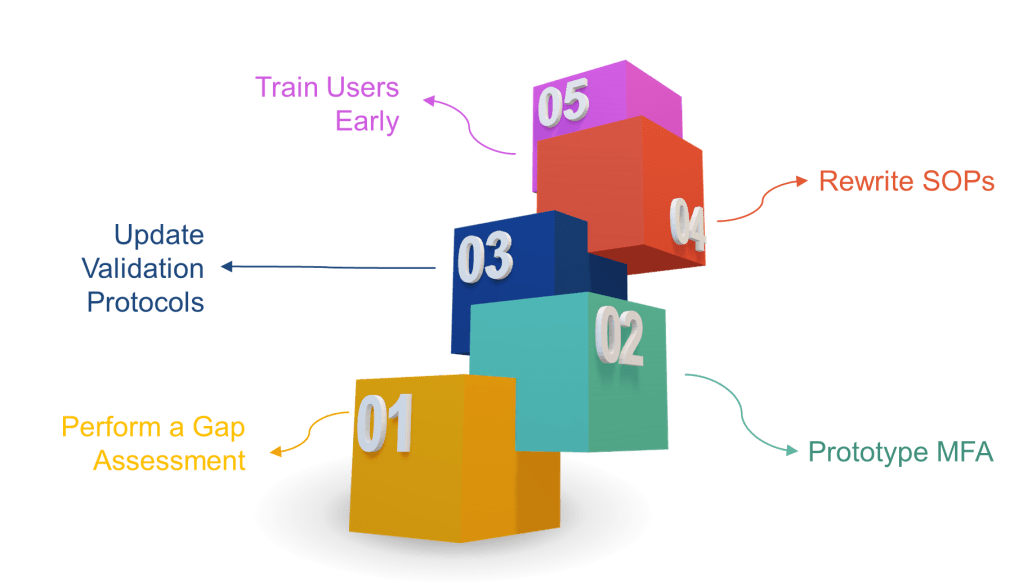
  1. Perform a gap assessment now—map every signature point to the new rules.
  2. Prototype MFA in your eDMS or MES. If users scream about friction, remind them that ransomware is worse.
  3. Update validation protocols to include time-zone, hybrid record, and non-repudiation tests.
  4. Rewrite SOPs to include signature-meaning prompts and periodic access-right recertification.
  5. Train users early. A 30-second “why you must re-authenticate” explainer video beats 300 deviations later.
Final Thoughts

The draft Annex 11 doesn’t just tweak wording—it yanks electronic signatures into the 2020s. Treat Section 13 as both a compliance obligation and an opportunity to slash latent data-integrity risk. Those who adapt now will cruise through 2026/2027 inspections while the laggards scramble for remediation budgets.

Not all Equipment is Category 3 in GAMP5

I think folks tend to fall into a trap when it comes to equipment and GAMP5, automatically assuming that because it is equipment it must be Category 3. Oh, how that can lead to problems.

When thinking about equipment it is best to think in terms of “No Configuration” and ” Low Configuration” software. This terminology is used to describe software that requires little to no configuration or customization to meet the user’s needs.

No Configuration(NoCo) aligns with GAMP 5 Category 3 software, which is described as “Non-Configured Products”. These are commercial off-the-shelf software applications that are used as-is, without any customization or with only minimal parameter settings. My microwave is NoCo.

Low Configuration(LoCo) typically falls between Category 3 and Category 4 software. It refers to software that requires some configuration, but not to the extent of fully configurable systems. My PlayStation is LoCo.

The distinction between these categories is important for determining the appropriate validation approach:

  • Category 3 (NoCo) software generally requires less extensive validation efforts, as it is used without significant modifications. Truly it can be implicit testing.
  • Software with low configuration may require a bit more scrutiny in validation, but still less than fully configurable or custom-developed systems.

Remember that GAMP 5 emphasizes a continuum approach rather than strict categorization. The level of validation effort should be based on the system’s impact on patient safety, product quality, and data integrity, as well as the extent of configuration or customization.

When is Something Low Configuration?

Low Configuration refers to software that requires minimal setup or customization to meet user needs, falling between Category 3 (Non-Configured Products) and Category 4 (Configured Products) software. Here’s a breakdown of what counts as low configuration:

  1. Parameter settings: Software that allows basic parameter adjustments without altering core functionality.
  2. Limited customization: Applications that permit some tailoring to specific workflows, but not extensive modifications.
  3. Standard modules: Software that uses pre-built, configurable modules to adapt to business processes.
  4. Default configurations: Systems that can be used with supplier-provided default settings or with minor adjustments.
  5. Simple data input: Applications that allow input of specific data or ranges, such as electronic chart recorders with input ranges and alarm setpoints.
  6. Basic user interface customization: Software that allows minor changes to the user interface without altering underlying functionality.
  7. Report customization: Systems that permit basic report formatting or selection of data fields to display.
  8. Simple workflow adjustments: Applications that allow minor changes to predefined workflows without complex programming.

It’s important to note that the distinction between low configuration and more extensive configuration (Category 4) can sometimes be subjective. The key is to assess the extent of configuration required and its impact on the system’s core functionality and GxP compliance. Organizations should document their rationale for categorization in system risk assessments or validation plans.

AttributeCategory 3 (No Configuration)Low ConfigurationCategory 4
Configuration LevelNo configurationMinimal configurationExtensive configuration
Parameter SettingsFixed or minimalBasic adjustmentsComplex adjustments
CustomizationNoneLimitedExtensive
ModulesPre-built, non-configurableStandard, slightly configurableHighly configurable
Default SettingsUsed as-isMinor adjustmentsSignificant modifications
Data InputFixed formatSimple data/range inputComplex data structures
User InterfaceFixedBasic customizationExtensive customization
Workflow AdjustmentsNoneMinor changesSignificant alterations
User Account ManagementBasic, often single-userLimited user roles and permissionsAdvanced user management with multiple roles and access levels
Report CustomizationPre-defined reportsBasic formatting/field selectionAdvanced report design
Example EquipmentpH meterElectronic chart recorderChromatography data system
Validation EffortMinimalModerateExtensive
Risk LevelLowLow to MediumMedium to High
Supplier DocumentationHeavily relied uponPartially relied uponSupplemented with in-house testing

Here’s the thing to be aware of, a lot of equipment these days is more category 4 than 3, as the manufacturers include all sorts of features, such as user account management and trending and configurable reports. And to be frank, I’ve seen too many situations where Programmable Logic Controllers (PLCs) didn’t take into account all that configuration from standard function libraries to control specific manufacturing processes.

Your methodology needs to keep up with the technological growth curve.

Handling Standard and Normal Changes from GAMP5

The folks behind GAMP5 are perhaps the worst in naming things. And one of the worse is the whole standard versus normal changes. Maybe when naming two types of changes do not use strong synonyms. Seems like good advice in general, when naming categories don’t draw from a list of synonyms.

Based on the search results, here are the key differences between a standard change and a normal change in GAMP 5:

Standard Change

  1. Pre-approved changes that are considered relatively low risk and performed frequently.
  2. Follows a documented process that has been reviewed and approved by Change Management.
  3. Does not require approval each time it is implemented.
  4. Often tracked as part of the IT Service Request process rather than the GxP Change Control process.
  5. Can be automated to increase efficiency.
  6. Has well-defined, repeatable steps.

So a standard change is one that is always done the same way, can be proceduralized, and is of low risk. In exchange for doing all that work, you get to do them by a standard process without the evaluation of a GxP change control, because you have already done all the evaluation and the implementation is the same every single time. If you need to perform evaluation or create an action plan, it is not a standard change.

Normal Change

  1. Any change that is not a Standard change or Emergency change.
  2. Requires full Change Management review for each occurrence.
  3. Raised as a GxP Change Control.
  4. Approved or rejected by the Change Manager, which usually means Quality review.
  5. Often involves non-trivial changes to services, processes, or infrastructure.
  6. May require somewhat unique or novel approaches.
  7. Undergoes assessment and action planning.

The key distinction is that Standard changes have pre-approved processes and do not require individual approval, while Normal changes go through the full change management process each time. Standard changes are meant for routine, low-risk activities, while Normal changes are for more significant modifications that require careful review and approval.

What About Emergency Changes

An emergency change is a change that must be implemented immediately to address an unexpected situation that requires urgent action to:

  1. Ensure continued operations
  2. Address a critical issue or crisis

Key characteristics of emergency changes in GAMP 5:

  1. They need to be expedited quickly to obtain authorization and approval before implementation.
  2. They follow a fast-track process compared to normal changes.
  3. A full change control should be filed for evaluation within a few business days after execution.
  4. Impacted items are typically withheld from further use pending evaluation of the emergency change.
  5. They represent a situation where there is an acceptable level of risk expected due to the urgent nature.
  6. Specific approvals and authorizations are still required, but through an accelerated process.
  7. Emergency changes may not be as thoroughly tested as normal changes due to time constraints.
  8. A remediation or back-out process should be included in case issues arise from the rapid implementation.
  9. The goal is to address the critical situation while minimizing impact to live services.

The key difference from standard or normal changes is that emergency changes follow an expedited process to deal with urgent, unforeseen issues that require immediate action, while still maintaining some level of control and documentation. However, they should still be evaluated and fully documented after implementation.

Hierarchical Task Analysis

Hierarchical Task Analysis (HTA) is a structured method for understanding and analyzing users’ tasks and goals within a system, product, or service. A technique of task decomposition, it visibly breaks down complex tasks into smaller, more manageable parts.

Key Concepts

  1. Goal-Oriented: HTA starts with identifying the main goal or objective of the task. This goal is then broken down into sub-goals and further into smaller tasks, creating a hierarchical structure resembling a tree.
  2. Hierarchical Structure: The analysis is organized hierarchically, with each level representing a task broken down into more detailed steps. The top level contains the main goal, and subsequent levels contain sub-tasks necessary to achieve that goal.
  3. Iterative Process: HTA is often an iterative process involving multiple rounds of refinement to ensure that all tasks and sub-tasks are accurately captured and organized.

Steps to Conduct HTA

  1. Preparation and Research: Gather information about the system, including user needs, tasks, pain points, and other relevant data. This step involves understanding the target audience and observing how the task or system is used in real-world scenarios.
  2. Define the Use Case: Identify the scope of the analysis and the specific use case to be mapped. This includes understanding what needs to be mapped, why it is being mapped, and which user segment will engage with the experience.
  3. Construct the Initial Flow Chart: Create an initial draft of the flow chart that includes all the steps needed to complete the task. Highlight interactions between different parts of the system.
  4. Develop the Diagram: Break the main task into smaller chunks and organize them into a task sequence. Each chunk should have a unique identifier for easy reference.
  5. Review the Diagram: Validate the diagram’s accuracy and completeness through walkthroughs with stakeholders and users. Gather feedback to refine the analysis.
  6. Report Findings and Recommendations: Identify opportunities for improvement and make recommendations based on the analysis. This step involves further user research and ideation, culminating in a report to share with team members and stakeholders.

Applications of HTA

  • UX Design: HTA helps UX designers understand user interactions and identify pain points, leading to improved user experiences.
  • Human Factors Engineering: Originally used to evaluate and improve human performance, HTA is effective in designing systems that align with human capabilities and limitations.
  • Training and Onboarding: HTA can create training materials and onboarding processes by breaking down complex tasks into manageable steps.
  • Process Improvement: By analyzing and visualizing tasks, HTA helps identify inefficiencies and areas for improvement in existing systems.

Benefits of HTA

  • Comprehensive Understanding: A detailed view of all steps involved in completing a task.
  • Identifies Opportunities for Improvement: Helps pinpoint critical steps, redundant tasks, and user struggles.
  • Facilitates Communication: Offers a clear and structured way to share findings with stakeholders.
  • Supports Complex Task Analysis: Handles detailed and complex tasks effectively, making it suitable for various applications.

Limitations of HTA

  • Not Suitable for All Tasks: HTA is less effective for tasks that are open, volatile, uncertain, complex, and ambiguous (e.g., emergency response, strategic planning).
  • Requires Iterative Refinement: The process can be time-consuming and may require multiple iterations to achieve accuracy.

Hierarchical Task Analysis for Computer System Validation (CSV)

As an example, we will create an HTA for a Computer System Validation (CSV) process through release. Not meant to be exhaustive but meant to illustrate the point.

1. Planning and Preparation

1.1 Develop a Validation Plan

  • Create a comprehensive validation plan outlining objectives, scope, and responsibilities.
  • Include timelines, resource allocation, and project management strategies.

1.2 Conduct Risk Assessment

  • Perform a risk assessment to identify potential risks and their impact on validation.
  • Document mitigation strategies for identified risks.

1.3 Define User Requirements

  • Gather and document User Requirements Specifications (URS).
  • Ensure that the URS aligns with regulatory requirements and business needs.

2. System Design and Configuration

2.1 Develop System Configuration Specifications (SCS)

  • Document the hardware and software configuration needed to support the system.
  • Ensure that the configuration meets the defined URS.

2.2 Installation Qualification (IQ)

  • Verify that the system is installed correctly according to the SCS.
  • Document the installation process and obtain objective evidence.

3. Testing and Verification

3.1 Operational Qualification (OQ)

  • Test the system to ensure it operates according to the URS.
  • Document test results and obtain objective evidence of system performance.

3.2 Performance Qualification (PQ)

  • Conduct performance tests to verify that the system performs consistently under real-world conditions (includes disaster recovery)
  • Document test results and obtain objective evidence.

4. User Readiness

4.1 Write Procedure

  • Create process and procedure to execute within the system
  • Create Training

4.2 Perform User Acceptance Testing

  • Confirmation business process meets requirements
  • Document test results and iteratively improve on process and training

5. Documentation and Reporting

5.1 Create Traceability Matrix

  • Develop a traceability matrix linking requirements to test case.
  • Ensure all requirements have been tested and verified.

5.2 Validation Summary Report

  • Compile a validation summary report detailing the validation process, test results, and any deviations.
  • Obtain approval from stakeholders.

Back Up and Recovery Testing

Backup and recovery testing are critical to ensuring data integrity and business continuity for critical computerized systems. They are also a hard regulatory requirement in our computer system lifecycle.

Part 11 (21 CFR 11.10 and 11.30) requires that:
“For the availability of computerized systems supporting critical processes, provisions should be made to ensure continuity of the systems in the event of an incident or system failure. This includes implementing adequate backup and recovery measures, as well as providing sufficient system redundancy and failover mechanisms.”

Part 11 also requires that “The backup and recovery processes must be validated in order to ensure that they operate in an effective and reliable manner.”

Similarly, Annex 11 requires that backup and recovery processes be validated to ensure they operate reliably and effectively. Annex 11 also requires that the validation process be documented and includes a risk assessment of the system’s critical processes.

Similar requirements can be found across the GxP data integrity requirements.

The regulatory requirements require that backup and recovery processes be validated to ensure they can reliably recover the system in case of an incident or failure. This validation process must be documented, including a risk assessment of the system’s critical processes.

Backup and recovery testing:

  1. Verifies Backup Integrity: Testing backups lets you verify that the backup data is complete, accurate, and not corrupted. It ensures that the backed-up data can be reliably restored when needed, maintaining the integrity of the original data.
  2. Validates Recovery Procedures: Regularly testing the recovery process helps identify and resolve any issues or gaps in the recovery procedures. This ensures that the data can be restored wholly and correctly, preserving its integrity during recovery.
  3. Identifies Data Corruption: Testing can reveal data corruption that may have gone unnoticed. By restoring backups and comparing them with the original data, you can detect and address any data integrity issues before they become critical.
  4. Improves Disaster Preparedness: Regular backup and recovery testing helps organizations identify and address potential issues before a disaster strikes. This improves the organization’s preparedness and ability to recover data with integrity in a disaster or data loss incident.
  5. Maintains Business Continuity: Backup and recovery testing helps maintain business continuity by ensuring that backups are reliable and recovery procedures are adequate. Organizations can minimize downtime and data loss, ensuring the integrity of critical business data and operations.

To maintain data integrity, it is recommended that backup and recovery testing be performed regularly. This should follow industry best practices and adhere to the organization’s recovery time objectives (RTOs) and recovery point objectives (RPOs). Testing should cover various scenarios, including full system restores, partial data restores, and data validation checks.

LevelDescriptionKey ActivitiesFrequency
Backup TestsEnsures data is backed up correctly and consistently.– Check backup infrastructure health
– Verify data consistency
– Ensure all critical data is covered
– Check security settings
Regularly (daily, weekly, monthly)
Recovery TestsEnsures data can be restored effectively and within required timeframes.– Test recovery time and point objectives (RTO and RPO)
– Define and test various recovery scopes
– Schedule tests to avoid business disruption
– Document all tests and results
Regularly (quarterly, biannually, annually)
Disaster Recovery TestsEnsures the disaster recovery plan is effective and feasible.– Perform disaster recovery scenarios
– Test failover and failback operations
– Coordinate with all relevant teams and stakeholders
Less frequent (once or twice a year)

By incorporating backup and recovery testing into the data lifecycle, organizations can have confidence in their ability to recover data with integrity, minimizing the risk of data loss or corruption and ensuring business continuity in the face of disasters or data loss incidents.

AspectBackup TestsRecovery Tests
ObjectiveVerify data integrity and backup processesEnsure data and systems can be successfully restored
FocusData backup and storageComprehensive recovery of data, applications, and infrastructure
ProcessesData copy verification, consistency checks, storage verificationFull system restore, spot-checking, disaster simulation
ScopeData-focusedBroader scope including systems and infrastructure
FrequencyRegular intervals (daily, weekly, monthly)Less frequent but more thorough
Testing AreasBackup scheduling, data transfer, storage capacityRecovery time objectives (RTO), recovery point objectives (RPO), failover/failback
ValidationBackup data is complete and accessibleRestored data and systems are fully functional