
The User Requirements are a foundational document identifying the system’s product and process requirements. These product quality-related user requirements are based on product knowledge (CQAs), process knowledge (CPPs), regulatory requirements, and organization/site quality requirements. Writing a good user requirement for quality requirements involves several critical steps to ensure clarity, specificity, and effectiveness.
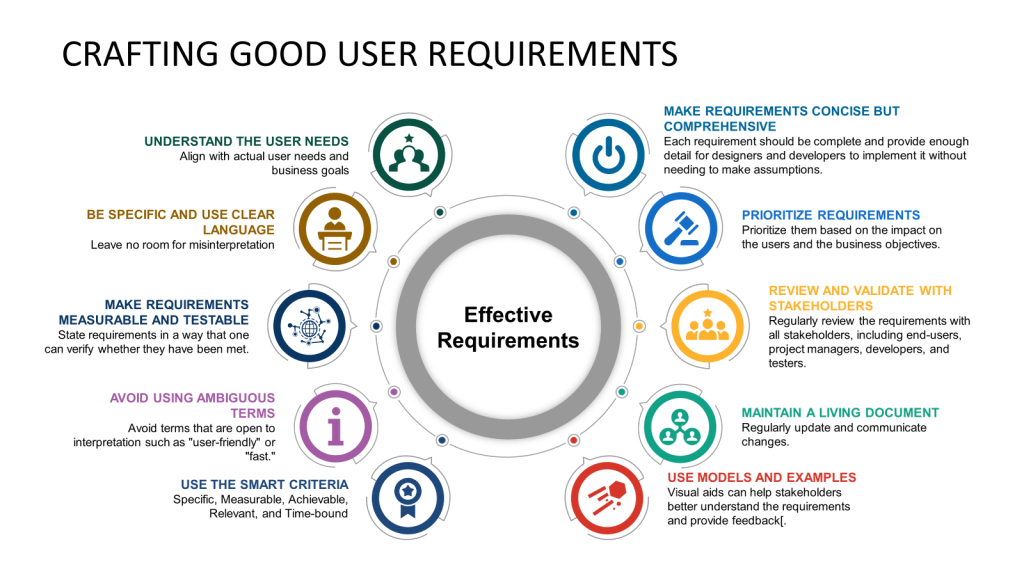
Understand the User Needs
Start by thoroughly understanding the user’s needs. This involves engaging with the end users or stakeholders to gather insights about their expectations, pain points, and the context in which the system will be used. This foundational step ensures that the requirements you develop are aligned with actual user needs and business goals.
Be Specific and Use Clear Language
Requirements should be specific and clearly stated to avoid ambiguity. Use simple, direct language and avoid technical jargon unless it is widely understood by all stakeholders. Define all terms and ensure that each requirement is phrased in a way that leaves no room for misinterpretation.
Make Requirements Measurable and Testable
Each requirement should be measurable and testable. This means stating requirements so one can verify whether they have been met. For example, instead of saying, “The system should load fast,” specify, “The system should load within 3 seconds when the number of simultaneous users is less than 10,000”.
Avoid Using Ambiguous Terms
Avoid terms open to interpretation, such as “user-friendly” or “fast.” If such terms are necessary, clearly define what they specifically mean in the context of your project. For instance, “user-friendly” is “the user can complete the desired task with no more than three clicks”.
Use the SMART Criteria
Employ the SMART criteria to ensure that each requirement is Specific, Measurable, Achievable, Relevant, and Time-bound. This approach helps set clear expectations and facilitates easier validation and verification of the requirements.
Make Requirements Concise but Comprehensive
While keeping each requirement concise and to the point is important, ensure all necessary details are included. Each requirement should be complete and provide enough detail for designers and developers to implement without making assumptions.
Prioritize Requirements
Not all requirements are equally important. Prioritize them based on their impact on the users and the business objectives. This helps manage the project scope and focuses on delivering maximum value.
It is good to categorize the user requirements here, such as:
- Quality
- Business
- Health, Safety, and Environmental (HSE)
Review and Validate with Stakeholders
Review the requirements regularly with all stakeholders, including end-users, project managers, developers, and testers. This collaborative approach helps identify gaps or misunderstandings early in the project lifecycle.
Maintain a Living Document
Requirements might evolve as new information emerges or business needs change. Maintain your requirements document as a living document, regularly update it, and communicate changes to all stakeholders.
Use Models and Examples
Where applicable, use diagrams, mock-ups, or prototypes to complement the written requirements. Visual aids can help stakeholders better understand the requirements and provide feedback.
When writing user requirements for quality requirements, it’s crucial to avoid common pitfalls that can lead to misunderstandings, scope creep, and, ultimately, a product that does not meet the needs of the users or stakeholders. Here are some of the most common mistakes to avoid:
Ambiguity and Lack of Clarity
One of the most frequent errors in writing requirements is ambiguity. Requirements should be clear and concise, with no room for interpretation. Using vague terms like “user-friendly” or “fast” without specific definitions can lead to unmet expectations because different people may interpret these terms differently.
Incomplete Requirements
Another common issue is incomplete requirements that do not capture all necessary details or scenarios. This can result in features that do not fully address the users’ needs or require costly revisions later in development.
Overlooking Non-Functional Requirements
Focusing solely on what the system should do (functional requirements) without considering how it should perform (non-functional requirements), such as performance, security, and usability, can jeopardize the system’s effectiveness and user satisfaction.
Failure to Involve Stakeholders
Not involving all relevant stakeholders in the requirements gathering and validation process can lead to missing critical insights or requirements important to different user groups. This often results in a product that does not fully meet the needs of all its users.
Scope Creep
Without a clear definition of scope, projects can suffer from scope creep, where additional features and requirements are added without proper review, leading to delays and budget overruns. It’s important to have a well-defined project scope and a change management process in place.
Not Prioritizing Requirements
Not all requirements are equally important. Failing to prioritize requirements can misallocate resources and efforts on less critical features. Using prioritization techniques like MoSCoW (Must have, Should have, Could have, Won’t have this time) can help manage and focus efforts on what truly matters.
Lack of Validation and Verification
Skipping the validation (ensuring the product meets the intended use and needs of the stakeholders) and verification (ensuring the product meets the specified requirements) processes can lead to a final product not aligned with user needs and expectations.
Poor Documentation and Traceability
Inadequate documentation and lack of traceability can lead to confusion and errors during development. Maintaining detailed documentation and traceability from requirements through to implementation is crucial to ensure consistency and completeness.
Ignoring the Importance of Clear Communication
Effective communication is essential throughout the requirements process. Miscommunication can lead to incorrect or misunderstood requirements being developed. Regular, clear communication and documentation updates are necessary to keep all stakeholders aligned.
Not Considering the Testing of Requirements
Considering how requirements will be tested during the definition phase is important. This consideration helps ensure that requirements are testable and that the final product will meet them. Planning for testing early can also highlight any potential issues with clarity or feasibility of requirements.



 Investigations of a Dog