Forms, forms, everywhere

Unless you work in the factory of the future the chances are you have forms — if you are like me over 1100 of them. So what is a form and how does it fit into our document management system?

Merriam-Webster Dictionary defines form (amongst other things) as “a printed or typed document with blank spaces for insertion of required or requested information.”

We use forms to tell what information needs to be captured, and usually to record when and by whom. Forms have the following advantages in our document management system:

  • The user has to write less
  • The user is told or reminded what information has to be supplied
  • There is uniformity
  • Information is collected in writing and so can be reexamined later. Forms almost always have a signature field to allow someone to take responsibility

It is useful to note here that electronic systems do basically the same thing.

Returning to our three major types of documents:

  • Functional Documents provide instructions so people can perform tasks and make decisions safely effectively, compliantly and consistently. This usually includes things like procedures, process instructions, protocols, methods and specifications. Many of these need some sort of training decision. Functional documents should involve a process to ensure they are up-to-date, especially in relation to current practices and relevant standards (periodic review)
  • Records provide evidence that actions were taken and decisions were made in keeping with procedures. This includes batch manufacturing records, logbooks and laboratory data sheets and notebooks. Records are a popular target for electronic alternatives.
  • Reports provide specific information on a particular topic on a formal, standardized way. Reports may include data summaries, findings and actions to be taken.

A form is a functional document that once printed and has data entered onto it becomes a record. That record then needs to be managed and has all sorts of good documentation and data integrity concerns including traceability and retention (archiving).

It is helpful here to also differentiate between a template and a form. A template is a form that is specifically used to build another document — an SOP template or a protocol template for example. Usually the template gives you a document that then goes through its own lifecycle.
Measures of success for changes

A colleague asks:

Is it a compliance risk to extend timelines on a change control?

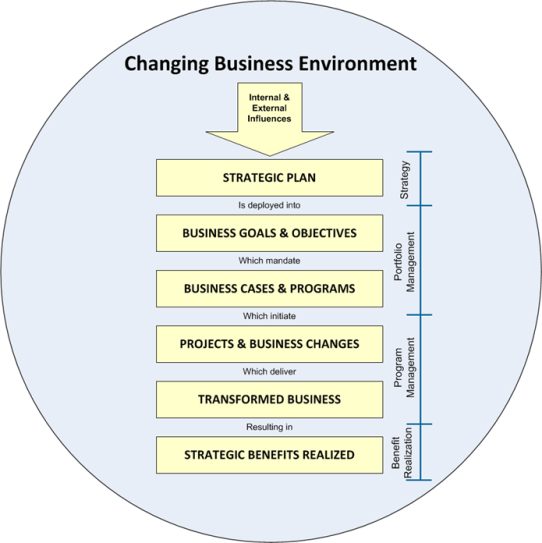
I want to take a step back to an important fundamental of change management to answer this question. All changes are done to realize strategic purposes; a good change management system is all about accelerating change. From the big transformations to the emergency changes to keep product being made each and every change has a strategic goal.

changing business environment

From this alignment to the strategy, each change has success metrics. Success metrics include economic, quality, technical and organization (among others) and they drive the how and the when of our change.

For example, a change driven by a CAPA to prevent reoccurrence will potentially have a different timeline than a change tied to a strategic goal to leverage a new way of working. But both have timelines driven by strategic to the tactical needs, usually filtered through a risk based prioritization tool.

And sometimes these change. The compliance aspect is not so much did you extend, it’s did you know what was happening with the change control in enough time to influence it in such a way to assure meeting the how.

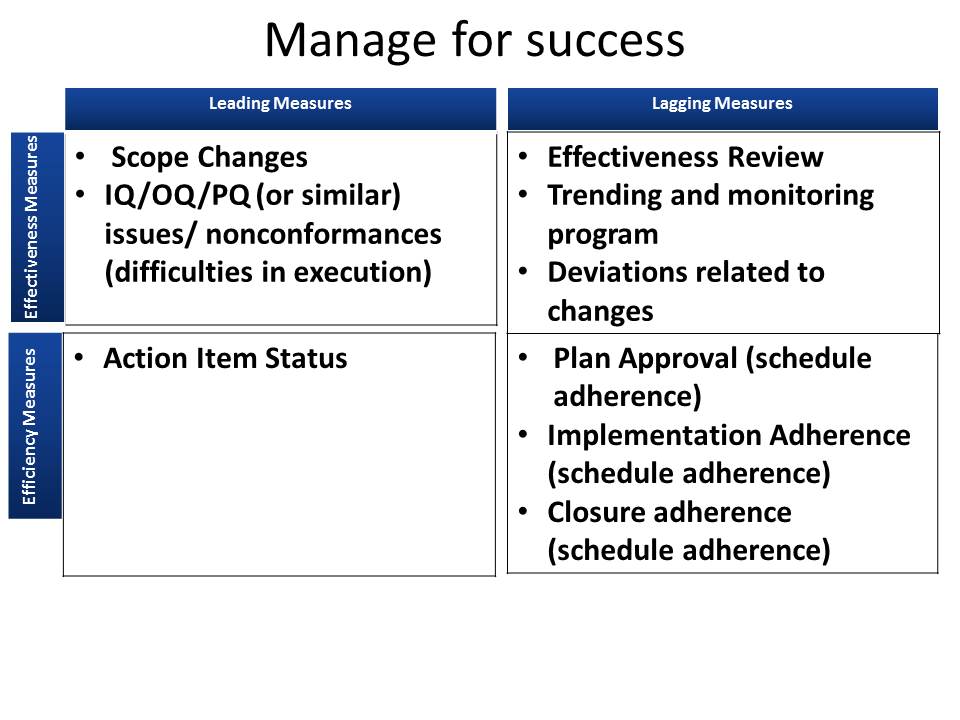
The KPIs and other measures built into your system should monitor and ensure your changes reach the intended benefits.

manage for success

To return to the original question. Unlike deviations/conformances where there is a specific requirements to complete in a timely way, and CAPAs where the root cause needs to be dealt with as soon as possible, change controls have their own internal timeline based on the drivers (which may be a CAPA). Extensions are not bad in a specific one-by-one change control approach. Instead they are indicative of larger troubles in the system and should be dealt with holistically to ensure you get the maximum benefit from your changes in the best possible time.

Look for trends in inspection activities

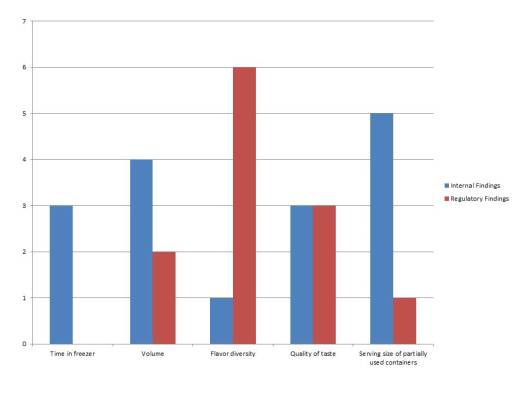
I’m in charge of ice cream, an important element of my household and as a result there are agreed upon criteria for success. I have internal inspectors (me) and external (my teenagers). I can thus produce a fairly simple graph of internal and external inspections and see the areas where there is a difference.

ice cream audit

From this I can tell which categories of findings are pain points and can look for systematic ways to fix them.

In my case, it’s clear the kids do not appreciate only having vanilla, strawberry and chocolate ice cream.

You can apply the same process to your internal vs. regulatory agencies (or certifying body or similar) audit findings.

You can quickly find two major patterns:

  1. Places you are gapping
  2. Places you are tougher than regulatory agencies

For those areas where you are gapping, evaluate your systems and determine what process improvements are necessary. A good area to include in this evaluation is the skill set of your internal auditors. For example, do you need more intensive data integrity training?

For those areas where you are tougher than regulatory agencies, do a quick check to ensure internal expectations are appropriately aligned. And then congratulate yourself.

You might have some areas where you have internal findings but absolutely no external. This might be a good indication that this might be a cutting edge area and you are doing a great job keeping ahead of the curve.

Take an additional step. Go to a source of inspection findings, such as the FDA’s 483 collection, and add them to your graph. This can help you identify additional areas of potential improvement. This can be especially helpful if you are a smaller company that does not have a wealth of data to draw.

We should all be doing what we can to anticipate trends and benchmark ourselves. This sort of data review and go a long way to finding some potential pain points before they get worse.


Group change controls

A colleague asks:

hoping you can provide your perspective on “grouping changes”. That is, rules or guidance on when it is appropriate to lump several small changes into one change control.

There are lots of reason’s to want to group changes into one change control – ease of implementation, a perception of “reducing work” or just convenience. I apply three general rules for when this is a good idea:

  1. Implementation
  2. Release of product
  3. Concreteness of work package

Implementation

All changes should have the same  “Change in Use” and “Regulatory Approval”

I talked about this is in “Changes become effective“:

Tell and Do Do and Tell Do and Report
Change in use After regulatory approval. When change is introduced to the ‘floor’ When change is introduced to the ‘floor’ When change is introduced to the ‘floor’
Regulatory approval Upon approvals After use, before send to market Upon reporting frequency (annual, within 6 months, within 1 year)
Sent to market After regulatory approval and change in use After regulatory approval and change in use After change in use

Ideally chose all changes that are “Do and Tell” or “Do and report”, I strongly do not recommend blending “Tell and Do,” there are just so many complexities here and it can lead to a constant revision of change controls and even increase risk of inadvertently sending products to the market.

Release of Product

All changes bundled together need to be releasable at the same time. Look at PQ/PV requirements and other testing that can be different and keep them in segregated change controls. Putting product on stability (or even needing stability data) is another good reason to separate changes.

Similarly, keep changes that have different internal product segregation requirements unbundled.

Concreteness of Work Bundles

The best reason to bundle changes is that they involve changing the same things: same documents, same automation, same piece of equipment. Once the bundling starts increasing scope of the change, it is time to have separate change controls.

If bundling changes starts changing your project management triangle (resources, time, scope)  then do a deep evaluation. You probably have separate change controls, even if they are under the same project.

Evaluate effectiveness reviews. Chances are totally separate effectiveness reviews for same impacted area are really separate changes.

What about risks?

You might notice that I do not call out risks as one of the criteria. Risks drive mitigations, which drive impact to the three criteria I gave. If a high risk’s mitigation does not trigger one of these criteria, it is usually not a problem to group the changes together. Though I’d pause and consider why the addition of a change that adds high risks does not drive mitigations that change the amount of work I am doing and ensure that is appropriately documented.

Conclusion

Sometimes bundling changes make sense. other times you will curse the day you agreed to bundle. I find these three rules provide a framework for making the decision.

Liminal – ‘In Between’ Words and Phrases

Words to describe those in-between, stuck in the middle, between the devil and the deep blue sea, liminal kinds of things.
— Read on www.merriam-webster.com/words-at-play/in-betweens-words-and-phrases/liminal

As a quality professional I can use threshold, interstice and even liminal and occasionally be-twixt. But now I need to be ‘between the devil and the deep blue sea’ more often at quality management reviews and the visual management boards.