Hierarchical Task Analysis

Hierarchical Task Analysis (HTA) is a structured method for understanding and analyzing users’ tasks and goals within a system, product, or service. A technique of task decomposition, it visibly breaks down complex tasks into smaller, more manageable parts.

Key Concepts

  1. Goal-Oriented: HTA starts with identifying the main goal or objective of the task. This goal is then broken down into sub-goals and further into smaller tasks, creating a hierarchical structure resembling a tree.
  2. Hierarchical Structure: The analysis is organized hierarchically, with each level representing a task broken down into more detailed steps. The top level contains the main goal, and subsequent levels contain sub-tasks necessary to achieve that goal.
  3. Iterative Process: HTA is often an iterative process involving multiple rounds of refinement to ensure that all tasks and sub-tasks are accurately captured and organized.

Steps to Conduct HTA

  1. Preparation and Research: Gather information about the system, including user needs, tasks, pain points, and other relevant data. This step involves understanding the target audience and observing how the task or system is used in real-world scenarios.
  2. Define the Use Case: Identify the scope of the analysis and the specific use case to be mapped. This includes understanding what needs to be mapped, why it is being mapped, and which user segment will engage with the experience.
  3. Construct the Initial Flow Chart: Create an initial draft of the flow chart that includes all the steps needed to complete the task. Highlight interactions between different parts of the system.
  4. Develop the Diagram: Break the main task into smaller chunks and organize them into a task sequence. Each chunk should have a unique identifier for easy reference.
  5. Review the Diagram: Validate the diagram’s accuracy and completeness through walkthroughs with stakeholders and users. Gather feedback to refine the analysis.
  6. Report Findings and Recommendations: Identify opportunities for improvement and make recommendations based on the analysis. This step involves further user research and ideation, culminating in a report to share with team members and stakeholders.

Applications of HTA

  • UX Design: HTA helps UX designers understand user interactions and identify pain points, leading to improved user experiences.
  • Human Factors Engineering: Originally used to evaluate and improve human performance, HTA is effective in designing systems that align with human capabilities and limitations.
  • Training and Onboarding: HTA can create training materials and onboarding processes by breaking down complex tasks into manageable steps.
  • Process Improvement: By analyzing and visualizing tasks, HTA helps identify inefficiencies and areas for improvement in existing systems.

Benefits of HTA

  • Comprehensive Understanding: A detailed view of all steps involved in completing a task.
  • Identifies Opportunities for Improvement: Helps pinpoint critical steps, redundant tasks, and user struggles.
  • Facilitates Communication: Offers a clear and structured way to share findings with stakeholders.
  • Supports Complex Task Analysis: Handles detailed and complex tasks effectively, making it suitable for various applications.

Limitations of HTA

  • Not Suitable for All Tasks: HTA is less effective for tasks that are open, volatile, uncertain, complex, and ambiguous (e.g., emergency response, strategic planning).
  • Requires Iterative Refinement: The process can be time-consuming and may require multiple iterations to achieve accuracy.

Hierarchical Task Analysis for Computer System Validation (CSV)

As an example, we will create an HTA for a Computer System Validation (CSV) process through release. Not meant to be exhaustive but meant to illustrate the point.

1. Planning and Preparation

1.1 Develop a Validation Plan

  • Create a comprehensive validation plan outlining objectives, scope, and responsibilities.
  • Include timelines, resource allocation, and project management strategies.

1.2 Conduct Risk Assessment

  • Perform a risk assessment to identify potential risks and their impact on validation.
  • Document mitigation strategies for identified risks.

1.3 Define User Requirements

  • Gather and document User Requirements Specifications (URS).
  • Ensure that the URS aligns with regulatory requirements and business needs.

2. System Design and Configuration

2.1 Develop System Configuration Specifications (SCS)

  • Document the hardware and software configuration needed to support the system.
  • Ensure that the configuration meets the defined URS.

2.2 Installation Qualification (IQ)

  • Verify that the system is installed correctly according to the SCS.
  • Document the installation process and obtain objective evidence.

3. Testing and Verification

3.1 Operational Qualification (OQ)

  • Test the system to ensure it operates according to the URS.
  • Document test results and obtain objective evidence of system performance.

3.2 Performance Qualification (PQ)

  • Conduct performance tests to verify that the system performs consistently under real-world conditions (includes disaster recovery)
  • Document test results and obtain objective evidence.

4. User Readiness

4.1 Write Procedure

  • Create process and procedure to execute within the system
  • Create Training

4.2 Perform User Acceptance Testing

  • Confirmation business process meets requirements
  • Document test results and iteratively improve on process and training

5. Documentation and Reporting

5.1 Create Traceability Matrix

  • Develop a traceability matrix linking requirements to test case.
  • Ensure all requirements have been tested and verified.

5.2 Validation Summary Report

  • Compile a validation summary report detailing the validation process, test results, and any deviations.
  • Obtain approval from stakeholders.

Task Decomposition

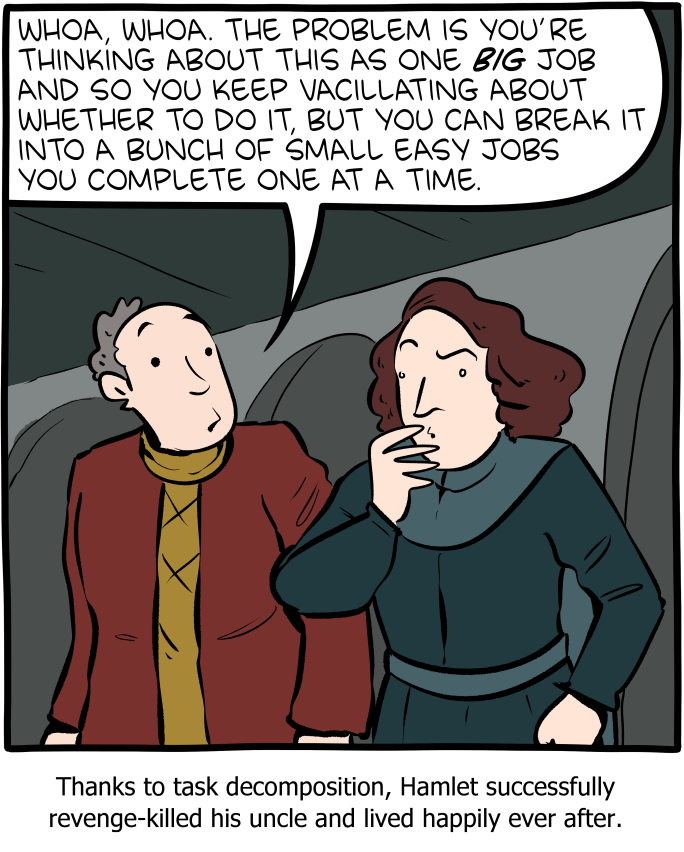
http://smbc-comics.com/comic/break-it-down

Task decomposition is a systematic approach to breaking down a complex task into smaller, more manageable components. A more detailed version of task analysis helps organize work, improve understanding, and facilitate effective execution.

Step 1: Understand the Task

The first step in task decomposition is to fully understand the task at hand. This involves defining the main objective, identifying the final deliverables, and recognizing all the requirements and constraints associated with the task.

Step 2: Break Down the Task

Once the task is clearly understood, the next step is to break it down into smaller, more manageable parts. This can be done by identifying the major components or phases of the task and then further dividing these into subtasks.

Techniques for Breaking Down Tasks:

  • Hierarchical Task Analysis (HTA): This involves creating a hierarchy of tasks, starting with the main task at the top and breaking it down into subtasks and further into individual actions.
  • Functional Decomposition: Focus on dividing the task based on different functions or processes involved.
  • Object-Oriented Decomposition: Used primarily in software development, where tasks are divided based on the objects or data involved.

Step 3: Sequence the Tasks

Determine the logical order in which the subtasks should be completed. This involves identifying dependencies between tasks, where some tasks must precede others.

Step 4: Assign Resources and Estimate Time

Assign the appropriate resources to each subtask, including personnel, tools, and materials. Additionally, estimate the time required to complete each subtask. This helps in scheduling and resource allocation.

Step 5: Prioritize Tasks

Not all tasks are equally important. Prioritize tasks based on their impact on the overall project, their urgency, and their dependencies.

Step 6: Monitor and Adjust

Once the decomposition and planning are in place, the execution phase begins. It’s important to monitor the progress of tasks, check adherence to timelines, and make adjustments as necessary. This might involve re-prioritizing tasks or re-allocating resources to address any bottlenecks or delays.

Step 7: Documentation and Feedback

Document the entire process and gather feedback. This documentation will serve as a valuable reference for future projects, and feedback can help in refining the decomposition process.

Task decomposition is a dynamic process that may require iterative adjustments. Used well, it is a powerful tool in the quality toolbox.

A task is a task is a task

It never ceases to amaze me how many ways an eQMS can subdivide a task. CAPA actions, change actions, meeting actions, supplier actions, etc, etc, etc. It is dizzying.

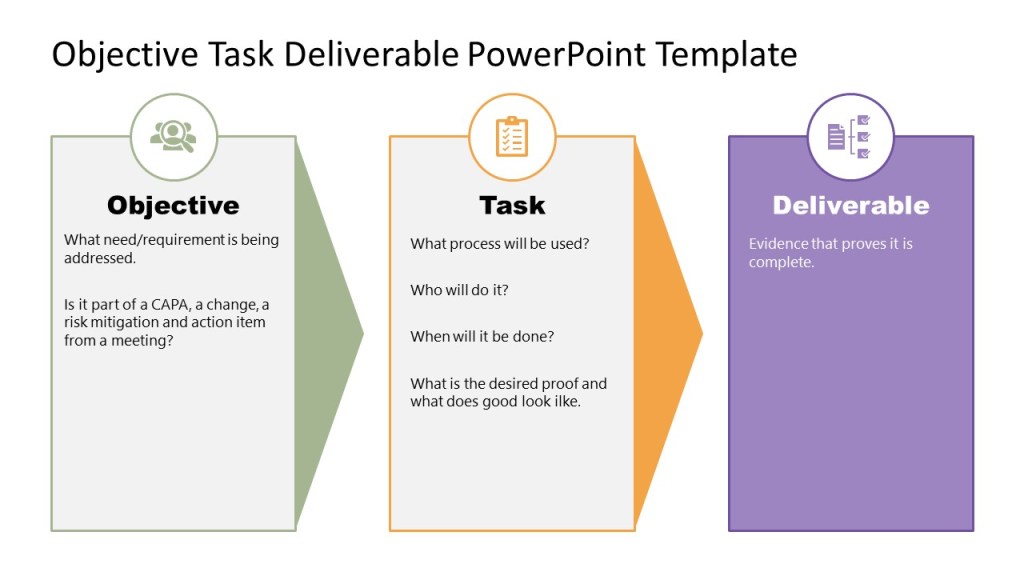
Tasks are all the same. They comprise of an objective, which is they why. A task (the who, when, what) and a deliverable (proof it is done)

I can count some off the shelf eQMS platforms that have 6+ workflows for this. Absolutely no need. It just makes the end user confused.

Just a little rant brought to by my favorite activity, implementing and improving eQMS functionality.

The Building Blocks of Work-as-Prescribed

Work-as-Prescribed – how we translate the desired activities into a set of process and procedure – relies on an understanding of how people think and process information.

The format is pivotal. The difficulties we have in quality are really not much different from elsewhere in society in that we are surrounded by confusing documentation and poorly presented explanations everywhere we look, that provide information but not understanding. Oftentimes we rely on canards of “this is what is expected,” “this is what works” – but rarely is that based on anything more than anecdotal. And as the high incidence of issues and the high cost of training shows, less than adequate.

There is a huge body-of-knowledge out there on cognitive-friendly design of visuals, including documentation. This is an area we as a quality profession need to get comfortable with. Most important, we need to give ourselves permission to adapt, modify and transform the information we need into a shape that aids understanding and makes everyone a better thinker.

Work-as-Prescribed (and work-as-instructed) is the creation of tools and technologies to help us think better, understand more and perform at our peak.

Locus of Understanding

Looking at the process at the right level is key. Think of Work-as-Prescribed as a lens. Sometimes you need a high-powered lens so that you can zoom in on a single task. Other times, you need to zoom out to see a set of tasks, a whole process, or how systems interact.

This is the locus of understanding, where understanding happens. When we take this position, we see how understanding is created. Adopting the locus of understanding means going to the right level for the problem at hand. When we apply it to Work-as-Prescribed we are applying the same principles as we do in problem-solving to developing the right tools to govern the work.

We are conducting knowledge management as part of our continuous improvement.

An important way to look is distributed cognitive resources, which means anything that contributes to the cognitive work being done. Adjusting the locus of understanding means that you can, and should, treat an SOP as a cognitive resource. Some of the memory is in your head and some is in the SOP. Work-as-prescribed is a cognitive resource that we distribute, routinely and casually across the brain and our quality system in the form of documents and other execution aids.

Other tools, like my favorite whiteboard, also serve as distributed cognitive resources.

So, as our documents and other tools are distributed cognitive resources it behooves us to ensure they are based on the best cognitive principles possible to drive the most benefit.

As an aside, there is a whole line of thought about why some physical objects are better at distributed cognitive resources than electronic. Movement actually matters.

Taking it even further (shifting the locus) we can see the entire quality system as a part of a single distributed cognitive system where cognitive work is performed via the cognitive functions of communicating, deciding, planning, and problem-solving. These cognitive functions are supported by cognitive processes such as perceiving, analyzing, exchanging, and manipulating.

Cognitive Activity in Work-As-Prescribed

The tools we develop to provide distributed cognitive activity strive to:

  • Provide short-term or long-term memory aids so that memory load can be reduced.
  • Provide information that can be directly perceived and used such that little effort is needed to interpret and formulate the information explicitly.
  • Provide knowledge and skills that are unavailable from internal representations.
  • Support perceptual operators that can recognize features easily and make inferences directly.
  • Anchor and structure cognitive behavior without conscious awareness.
  • Change the nature of a task by generating more efficient action sequences.
  • Stop time and support perceptual rehearsal to make invisible and transient information visible and sustainable.
  • Aid processibility by limiting abstraction.
  • Determine decision making strategies through accuracy maximization and effort minimization.

Driving Work-As Prescribed

As we build our requirements documents, our process and procedure, there are a few principles to keep in mind to better tap into distributed cognitive resources.

Plan for the flow of information: Think about paths, relationships, seams, edges and other hand-offs. Focus on the flow of information. Remember that we learn in a spiral, and the content needed for a novice is different from that of an expert and build our documents and the information flow accordingly. This principle is called Sequencing.

Break information down into pieces: Called, Chunking, the grouping together of information into ideally sized pieces. When building Work-As-Prescribed pay close attention to which of these chunks are reusable and build accordingly.

The deeply about context: How a tool is used drives what the tool should be.

Think deeply about information structures: Not all information is the same, not every example of Work-as-Prescribed should have the same structure.

Be conscientious about the digital and physical divide: Look for opportunities to integrate or connect these two worlds. Be honest of how enmeshed they are at any point in the system.

We are building our Work-as-Prescribed through leveraging our quality culture, our framework for coordinating work. Pay attention to:

  1. Shared Standards – Ways we communicate
  2. Invisible Environments – Ways we align, conceptually
  3. Visible Environments – Ways we collaborate
  4. Psychological Safety – Ways we behave
  5. Perspectives – Ways we see (and see differently)

Principles in Practice

When design process, procedure and task documentation leverage this principles by build blocks, or microcontent, that is:

  • about one primary idea, fact, or concept
  • easily scannable
  • labeled for clear identification and meaning, and
  • appropriately written and formatted for use anywhere and any time it is needed.

There is a common miscomprehension that simple means short. That just isn’t true. Simple means that it passes a test for the appropriateness of the size of a piece of content of providing sufficient details to answer a specific question for the targeted audience. The size of the content must effectively serve its intended purpose with efficiency, stripping off any unnecessary components.

We need to strive to apply cognitive thinking principles to our practice. The day of judging a requirements document by its page length is long over.

Constituents of cognitive thinking applied to Work-As-Prescribed

The RACI (and RASCI) Chart

What is a RACI chart?

A RACI chart is a simple matrix used to assign roles and responsibilities for each task, milestone, or decision. By clearly mapping out which roles are involved in each task and at which level, you can eliminate confusion and answer the age-old question, Who’s doing what?”

RACI is a useful complement to a process map, since it can get into more detailed and specific activities than a high-level process map. Think of a process map at one level of abstraction and RACI as the next level of detail

What does RACI stand for?

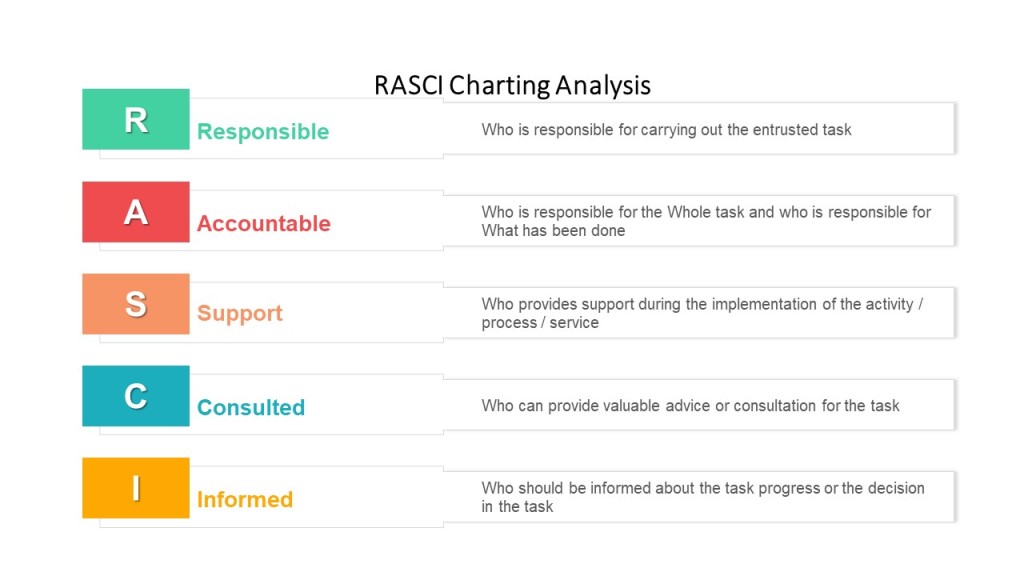
RACI stands for Responsible, Accountable, Consulted, Informed. Each letter in the acronym represents a level of task responsibility.

When to use RACI

RACI’s are best used in procedures as part of the responsibilities section or to start each section in a long procedure.

RACI’s are great tools that can help:

  • Design or re-design processes more efficiently by highlighting decisions
  • Clarify overlapping, redundant, “bottle-necked,” or inconsistent responsibilities
  • Structure and distribute responsibility and authority
  • Establish clear lines of communication
  • Reduce duplication of efforts; pinpoint what can “come off the plate”

RACI definitions

A RACI is a matrix of tasks or deliverables and the roles associated with them.

Each box in the matrix identifies that role’s function in the task

  • Responsible – primary role performing the work
  • Accountable – role primarily responsible for the work getting done (and done correctly)
  • Consulted – roles providing input into the task or deliverable. Consulted means prior to the decision/activity.
  • Informed – roles to be informed of the outcome of the task or deliverable so that they may fulfill execute their role in the process or other process.

I’m a big fan of adding Supporting, and doing a RASCI. Supporting is very helpful in identifying individuals who provide support services, and often capture indirect accountabilities.

RASCI Chart

Key point – only one Responsible and one Accountable role for any task or deliverable.  In some processes, Responsible and Accountable may be the same role

How to create a RACI

Follow these 3 steps, using the RACI chart example below as your guide:

  • Enter all responsibilities in the procedure across the top row.
  • List all procedural steps/tasks, milestones, and decisions down the left column.
  • For each step, assign a responsibility value to each role or person on the team.

Ensure the following:

  • Every task has one Responsible person (and only one!).
  • There’s one (and only one!) Accountable party assigned to each task to allow for clear decision-making.
  • If you have a lot of C and I roles on your matrix, make sure you have an easy and lightweight way to keep them informed in the procedure.

Some points to consider:

  • Have a representative from each of the major functions that participate in the process
  • Reach consensus on all Accountabilities and Responsibilities
  • Consider the emotional aspects of documenting “A”s and “R”s, including job justification
  • Eliminate excessive “C”s and “I”s
  • Consider the organization’s culture

Review the RACI chart vertically to:

  • Avoid under- or over-committing positions or team members
  • Eliminate unnecessary gates and bottlenecks
  • Designate appropriate skill sets

Review the RACI chart horizontally to:

  • Clarify any ambiguous division of labor
  • Ensure adequate continuity across decisions and process steps
  • Ensure accountability and authority to get the job done

Although the RACI is a simple tool, the process of creating it and having it agreed is a political process.

Developing RACI charts surfaces many organizational issues because it confronts the three elements of roles and responsibilities:

  • Role Conception:  what people think their jobs are and how they have been trained to perform them
  • Role Expectation:  what others in the organization think another person’s job is and how it should be carried out
  • Role Behavior:  what people actually do in carrying out their job

Example

  Deviation CreatorArea ResponsibleQAInvestigation TeamSite Head
Take real-time action to minimize and contain the effect of an event RAI
Assemble cross functional team for Triage  RAI
Determine if the event is a deviation  RCAC
Define batch association strategy  CRAI
Define Containment  CRAC
Create Deviation in eQMS in 24 hr  RAI
Gather Data  CA/RCC