Process Mapping as a Scaling Solution (part 1)

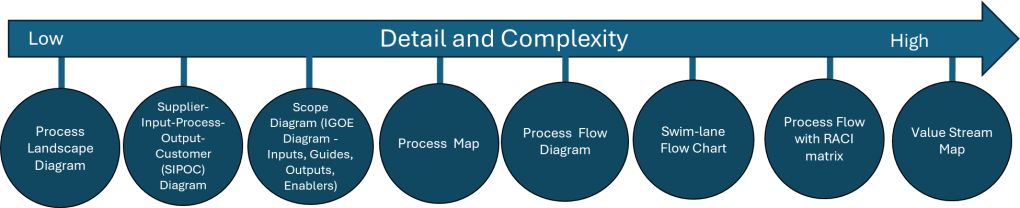
I love a good process map in all it’s permutations. It is important to remember that the various process mapping tools are on a scale on order of detail and complexity.
Tool NameDescription
Process Landscape DiagramA Process Landscape Diagram is a visual representation that outlines the structure and interdependencies of processes within an organization, providing insight into how these processes work together to achieve strategic goals. This tool helps in understanding process flows and managing business operations more effectively by illustrating connections and hierarchies among various processes.
SIPOCSIPOC is a visual representation tool for documenting a business process from beginning to end. It provides a high-level overview by summarizing the key components of Suppliers, Inputs, Processes, Outputs, and Customers.
Scope Diagram (IGOE Diagram)
The Scope Diagram, also known as the IGOE Diagram, is used to define and agree on the boundaries of a process, enhancing communication among stakeholders. This diagram illustrates the scope of a project at a high abstraction level and helps identify candidate processes for change. It focuses on the Inputs, Guides, Outputs, and Enablers of a business process, facilitating better understanding and management of the scope by clarifying process boundaries without detailing internal system features.
Process MapA Process Map is a visual tool used to represent the flow of work and the steps involved in a business process. This tool helps teams understand, analyze, and improve workflows by detailing the processes involved, making it easier to identify inefficiencies and areas for improvement. Process maps are often utilized in project management and continuous improvement efforts to enhance productivity and streamline operations.
Process Flow DiagramA Process Flow Diagram (PFD) is a diagram commonly used to indicate the general flow of plant processes and equipment. It visualizes the sequential steps and relationships between components in a process, aiming to improve project planning and identify inefficiencies.
Swim-lane Flow ChartA Swim-lane Flow Chart, also known as a cross-functional diagram, is a type of flowchart that shows the workflow and responsibilities in a process. It visually segments tasks into lanes that clarify who is responsible for each step, making it easier to understand complex processes and identify inefficiencies or redundancies.
Process Flow with RACI matrixThe RACI matrix is a project management tool that clarifies roles and responsibilities of team members by categorizing them into four groups: Responsible, Accountable, Consulted, and Informed. This structure aids in ensuring effective communication and workflow management across various stages of a project, helping teams stay aligned and avoiding confusion.
Process Mapping Tools

Process Landscape Diagram

A process landscape diagram is a high-level visual representation of an organization’s business processes and their relationships. Process landscape diagrams provide a comprehensive overview of an organization’s processes at a macro level and define the scope and relationships between an organization’s business processes. This serves as a simple way to handle process-related communication and serves as a starting point for detailed process discovery.

The process landscape diagram represents processes as ‘black-boxes’, focusing on interrelationships rather than internal details. Thus it shows the structure, grouping, modularity, functionality, and technology of chain processes, business processes, and working processes. Ideally this should include connections to external participants or stakeholders.

Components and Structure

A typical process landscape diagram may include:

  • Core processes (value chain or end-to-end processes)
  • Management processes
  • Support processes
  • Relationships and dependencies between processes
  • Connections to external participants or stakeholders

When to do

The process landscape diagram is design to enable organizations to maintain an overview of processes which makes this an excellent centerpiece to your Quality Manual.

ICH Q10 actually has a nice process landscape in it.

SIPOC

I’ve written about SIPOC’s in the past.
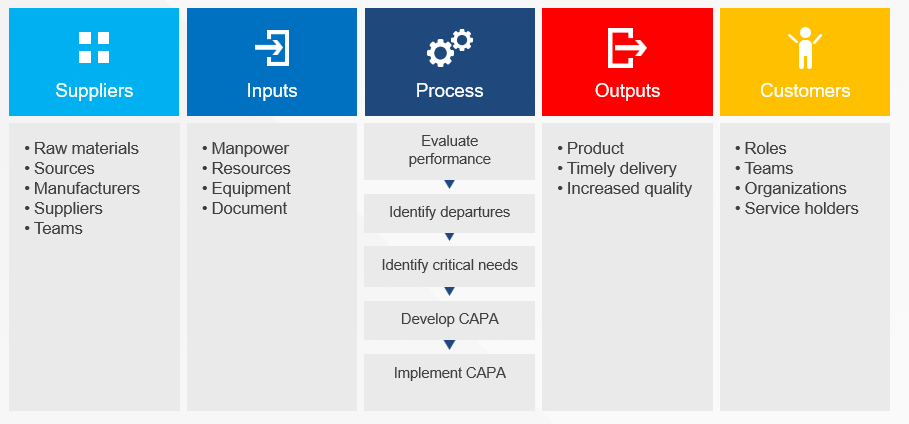
SIPOC diagrams are powerful tools in process improvement and management, offering numerous advantages that make them invaluable in various scenarios. These diagrams provide a high-level overview of a process, enabling teams to grasp the big picture quickly and efficiently. By facilitating clear communication and collaboration among team members and stakeholders, SIPOC diagrams help break down silos and foster a shared understanding of complex processes. This clarity often leads to the identification of improvement opportunities and potential problem areas that might otherwise go unnoticed.

One of the key strengths of SIPOC diagrams lies in their versatility. They serve as excellent tools for defining and scoping complex projects, helping teams to set clear boundaries and objectives from the outset. Additionally, these diagrams aid in understanding customer requirements and managing supplier relationships, two critical aspects of any business process. SIPOC diagrams also prove invaluable as training tools for new employees, offering a concise yet comprehensive overview of how a process functions within the larger organizational context.

The use of SIPOC diagrams is particularly beneficial when embarking on new process improvement projects or redesigning existing processes by providing a structured approach to understanding the current state and envisioning future improvements. They’re also extremely useful in situations where the scope of a project is unclear or poorly defined, helping to bring clarity and focus to the team’s efforts.

SIPOC diagrams excel in fostering cross-functional collaboration. By providing a common language and visual representation of a process, they facilitate discussions and decision-making among different departments or stakeholders. This makes them particularly valuable in problem-solving initiatives and when ensuring compliance with regulations and standards. SIPOC diagrams also serve as effective tools for supplier evaluation and performance assessment, helping organizations maintain strong relationships with their supply chain partners.

SIPOC diagrams are most effective when there’s a need to quickly visualize and understand a process without delving into excessive detail. They help teams focus on the essential elements of a process and provide a solid foundation for more in-depth analysis and improvement efforts. Whether used in the early stages of a project, for ongoing process management, or as part of continuous improvement initiatives, SIPOC diagrams offer a simple yet powerful way to enhance understanding, communication, and efficiency across an organization.

I love a SIPOC in a program level document.

Scope Diagram (IGOE Diagram)

IGOE stands for Inputs-Guides-Outputs-Enablers, the basic components of any business process. This model is used to define the scope of a process with an initial, high-level overview of the process in-scope and the problems associated with that process and the relationships between the process-in-scope, upstream or downstream processes, relevant documents, stakeholders etc.
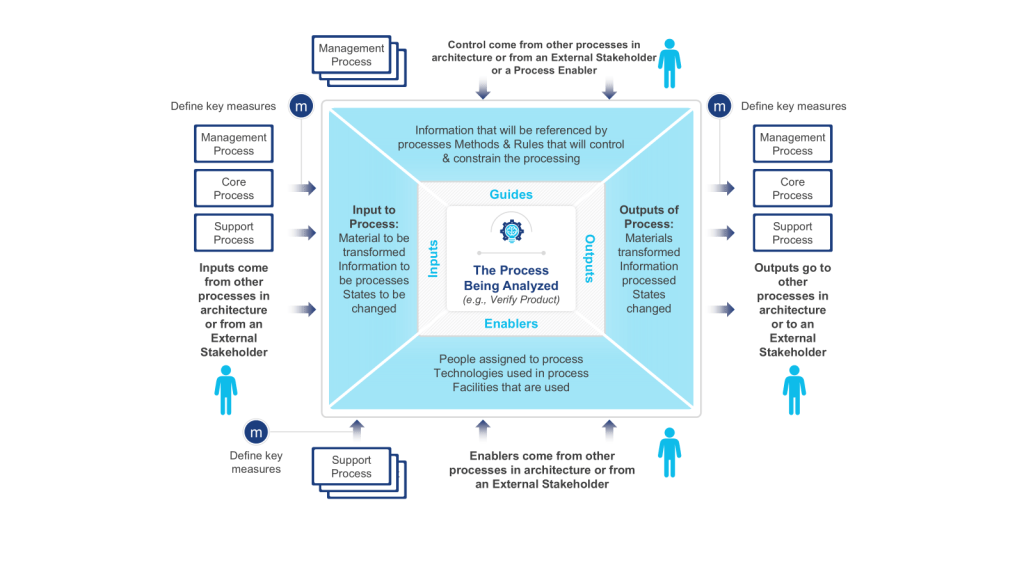
Scope Diagram- IGOE
  • Input is defined as something that is transformed or consumed, input can be information, materials, people
  • Guide is defined as anything that describes the when, why, or how a process or activity occurs, guides can be policies, strategies, regulations, law
  • Outputs are the product or result of the change that occurs to the Inputs or the result of the creation of something based on the Guides, outputs can be results, deliverables, products, information, people
  • Enablers are the resources or assets required to transform an Input into an Output or to create Outputs, enablers can be systems, equipment, tools, assets, facilities, human resources

These diagrams are particularly useful at the outset of a process improvement project, serving as a powerful means to define and agree upon the boundaries of a process. By clearly illustrating the process scope and interactions, IGOE diagrams play a crucial role in setting the right expectations among project stakeholders and establishing a solid foundation for the improvement effort.

One of the key strengths of IGOE diagrams lies in their ability to measure the reach of a process. By explicitly showing how the business interacts with external entities, these diagrams provide a systematic way to assess impact. This can really help identify stakeholders in a project.

Process owners and subject matter experts often turn to IGOE diagrams for high-level root cause analysis. This application allows them to conduct a relatively accurate assessment to determine the focus and scope of an improvement project.

Scope diagrams excel in enhancing communication with various stakeholders. Their intuitive nature and lack of technical jargon make them accessible to a wide audience, facilitating better understanding and alignment among team members and stakeholders. This clarity in communication is particularly beneficial when defining vision and building consensus.

Another significant advantage of scope diagrams is their ability to illustrate process dependencies. By providing a clear picture of the factors that shape processes, these diagrams create a better understanding of potential future process iterations. This insight is invaluable during task prioritization, as the additional information about importance and impact can guide strategic decision-making in the project.

Scope diagrams are most effective in communicating a comprehensive understanding of a process’s scope, boundaries, and interactions with its environment. Whether used at the beginning of an improvement initiative, for aligning stakeholders on process scope and impact, or as a precursor to more detailed process analysis, IGOE diagrams offer a structured and insightful approach to process understanding and improvement planning.

This is a tool we don’t use enough.

Process Map

Process maps are powerful visual tools that provide a clear and comprehensive representation of workflows or processes within an organization. These diagrams illustrate the sequence of steps, activities, and decisions involved in completing a task or achieving a specific outcome. By offering a visual overview of how a process works from start to finish, process maps serve multiple purposes, including identifying inefficiencies and bottlenecks, facilitating communication among team members and stakeholders, and serving as valuable training resources for new employees.

The versatility of process maps makes them indispensable in various business scenarios. At the outset of process improvement projects, these visual aids help teams gain a thorough understanding of the current state of a process before embarking on optimization or redesign efforts. They are particularly useful when defining project scope, as they assist in setting clear boundaries and expectations for process improvement initiatives. For complex processes, maps break down intricate workflows into more manageable, understandable steps, making them easier to analyze and improve.

Process maps excel as communication tools, proving invaluable during team brainstorming sessions by providing a visual aid for discussing and analyzing processes. They also serve as effective training resources for new hires, offering a clear, step-by-step guide to understanding roles and responsibilities within the organization. When documenting standard operating procedures, process maps complement written instructions, enhancing clarity and comprehension.

In problem-solving scenarios, process maps are instrumental in identifying the root causes of issues within a workflow. They allow teams to examine each step of a process for efficiency and effectiveness during process analysis, leading to more targeted improvements. Furthermore, process maps provide a concise way to explain processes to stakeholders who may not be directly involved in day-to-day operations, fostering better understanding and alignment across the organization.

When implementing new systems or technologies, process maps help identify how these tools will impact existing workflows, facilitating smoother transitions and integration. This makes them particularly valuable in organizations focused on continuous improvement, quality management, and operational efficiency.

Process maps are versatile tools that can be employed whenever there’s a need to understand, analyze, improve, or communicate about a process. Their visual nature makes complex information more accessible, promoting better decision-making and more effective process management. Whether used in small-scale departmental improvements or large-scale organizational transformations, process maps remain a fundamental tool in the arsenal of business process management and continuous improvement methodologies.

In my next post in this series I will start with Business Process Notation as a methodology for process mapping.

Hierarchical Task Analysis

Hierarchical Task Analysis (HTA) is a structured method for understanding and analyzing users’ tasks and goals within a system, product, or service. A technique of task decomposition, it visibly breaks down complex tasks into smaller, more manageable parts.

Key Concepts

  1. Goal-Oriented: HTA starts with identifying the main goal or objective of the task. This goal is then broken down into sub-goals and further into smaller tasks, creating a hierarchical structure resembling a tree.
  2. Hierarchical Structure: The analysis is organized hierarchically, with each level representing a task broken down into more detailed steps. The top level contains the main goal, and subsequent levels contain sub-tasks necessary to achieve that goal.
  3. Iterative Process: HTA is often an iterative process involving multiple rounds of refinement to ensure that all tasks and sub-tasks are accurately captured and organized.

Steps to Conduct HTA

  1. Preparation and Research: Gather information about the system, including user needs, tasks, pain points, and other relevant data. This step involves understanding the target audience and observing how the task or system is used in real-world scenarios.
  2. Define the Use Case: Identify the scope of the analysis and the specific use case to be mapped. This includes understanding what needs to be mapped, why it is being mapped, and which user segment will engage with the experience.
  3. Construct the Initial Flow Chart: Create an initial draft of the flow chart that includes all the steps needed to complete the task. Highlight interactions between different parts of the system.
  4. Develop the Diagram: Break the main task into smaller chunks and organize them into a task sequence. Each chunk should have a unique identifier for easy reference.
  5. Review the Diagram: Validate the diagram’s accuracy and completeness through walkthroughs with stakeholders and users. Gather feedback to refine the analysis.
  6. Report Findings and Recommendations: Identify opportunities for improvement and make recommendations based on the analysis. This step involves further user research and ideation, culminating in a report to share with team members and stakeholders.

Applications of HTA

  • UX Design: HTA helps UX designers understand user interactions and identify pain points, leading to improved user experiences.
  • Human Factors Engineering: Originally used to evaluate and improve human performance, HTA is effective in designing systems that align with human capabilities and limitations.
  • Training and Onboarding: HTA can create training materials and onboarding processes by breaking down complex tasks into manageable steps.
  • Process Improvement: By analyzing and visualizing tasks, HTA helps identify inefficiencies and areas for improvement in existing systems.

Benefits of HTA

  • Comprehensive Understanding: A detailed view of all steps involved in completing a task.
  • Identifies Opportunities for Improvement: Helps pinpoint critical steps, redundant tasks, and user struggles.
  • Facilitates Communication: Offers a clear and structured way to share findings with stakeholders.
  • Supports Complex Task Analysis: Handles detailed and complex tasks effectively, making it suitable for various applications.

Limitations of HTA

  • Not Suitable for All Tasks: HTA is less effective for tasks that are open, volatile, uncertain, complex, and ambiguous (e.g., emergency response, strategic planning).
  • Requires Iterative Refinement: The process can be time-consuming and may require multiple iterations to achieve accuracy.

Hierarchical Task Analysis for Computer System Validation (CSV)

As an example, we will create an HTA for a Computer System Validation (CSV) process through release. Not meant to be exhaustive but meant to illustrate the point.

1. Planning and Preparation

1.1 Develop a Validation Plan

  • Create a comprehensive validation plan outlining objectives, scope, and responsibilities.
  • Include timelines, resource allocation, and project management strategies.

1.2 Conduct Risk Assessment

  • Perform a risk assessment to identify potential risks and their impact on validation.
  • Document mitigation strategies for identified risks.

1.3 Define User Requirements

  • Gather and document User Requirements Specifications (URS).
  • Ensure that the URS aligns with regulatory requirements and business needs.

2. System Design and Configuration

2.1 Develop System Configuration Specifications (SCS)

  • Document the hardware and software configuration needed to support the system.
  • Ensure that the configuration meets the defined URS.

2.2 Installation Qualification (IQ)

  • Verify that the system is installed correctly according to the SCS.
  • Document the installation process and obtain objective evidence.

3. Testing and Verification

3.1 Operational Qualification (OQ)

  • Test the system to ensure it operates according to the URS.
  • Document test results and obtain objective evidence of system performance.

3.2 Performance Qualification (PQ)

  • Conduct performance tests to verify that the system performs consistently under real-world conditions (includes disaster recovery)
  • Document test results and obtain objective evidence.

4. User Readiness

4.1 Write Procedure

  • Create process and procedure to execute within the system
  • Create Training

4.2 Perform User Acceptance Testing

  • Confirmation business process meets requirements
  • Document test results and iteratively improve on process and training

5. Documentation and Reporting

5.1 Create Traceability Matrix

  • Develop a traceability matrix linking requirements to test case.
  • Ensure all requirements have been tested and verified.

5.2 Validation Summary Report

  • Compile a validation summary report detailing the validation process, test results, and any deviations.
  • Obtain approval from stakeholders.

Task Decomposition

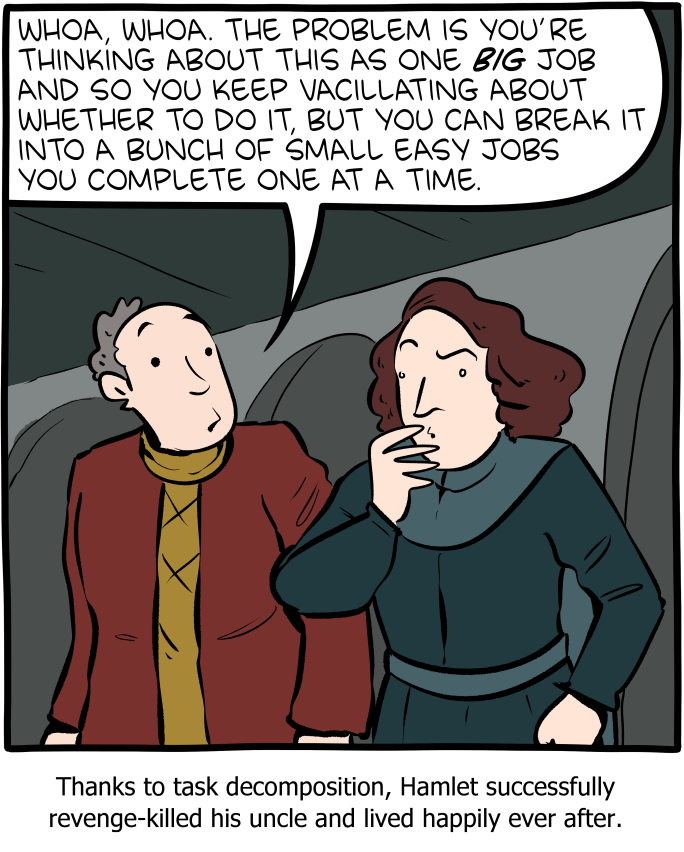
http://smbc-comics.com/comic/break-it-down

Task decomposition is a systematic approach to breaking down a complex task into smaller, more manageable components. A more detailed version of task analysis helps organize work, improve understanding, and facilitate effective execution.

Step 1: Understand the Task

The first step in task decomposition is to fully understand the task at hand. This involves defining the main objective, identifying the final deliverables, and recognizing all the requirements and constraints associated with the task.

Step 2: Break Down the Task

Once the task is clearly understood, the next step is to break it down into smaller, more manageable parts. This can be done by identifying the major components or phases of the task and then further dividing these into subtasks.

Techniques for Breaking Down Tasks:

  • Hierarchical Task Analysis (HTA): This involves creating a hierarchy of tasks, starting with the main task at the top and breaking it down into subtasks and further into individual actions.
  • Functional Decomposition: Focus on dividing the task based on different functions or processes involved.
  • Object-Oriented Decomposition: Used primarily in software development, where tasks are divided based on the objects or data involved.

Step 3: Sequence the Tasks

Determine the logical order in which the subtasks should be completed. This involves identifying dependencies between tasks, where some tasks must precede others.

Step 4: Assign Resources and Estimate Time

Assign the appropriate resources to each subtask, including personnel, tools, and materials. Additionally, estimate the time required to complete each subtask. This helps in scheduling and resource allocation.

Step 5: Prioritize Tasks

Not all tasks are equally important. Prioritize tasks based on their impact on the overall project, their urgency, and their dependencies.

Step 6: Monitor and Adjust

Once the decomposition and planning are in place, the execution phase begins. It’s important to monitor the progress of tasks, check adherence to timelines, and make adjustments as necessary. This might involve re-prioritizing tasks or re-allocating resources to address any bottlenecks or delays.

Step 7: Documentation and Feedback

Document the entire process and gather feedback. This documentation will serve as a valuable reference for future projects, and feedback can help in refining the decomposition process.

Task decomposition is a dynamic process that may require iterative adjustments. Used well, it is a powerful tool in the quality toolbox.

The RACI (and RASCI) Chart

What is a RACI chart?

A RACI chart is a simple matrix used to assign roles and responsibilities for each task, milestone, or decision. By clearly mapping out which roles are involved in each task and at which level, you can eliminate confusion and answer the age-old question, Who’s doing what?”

RACI is a useful complement to a process map, since it can get into more detailed and specific activities than a high-level process map. Think of a process map at one level of abstraction and RACI as the next level of detail

What does RACI stand for?

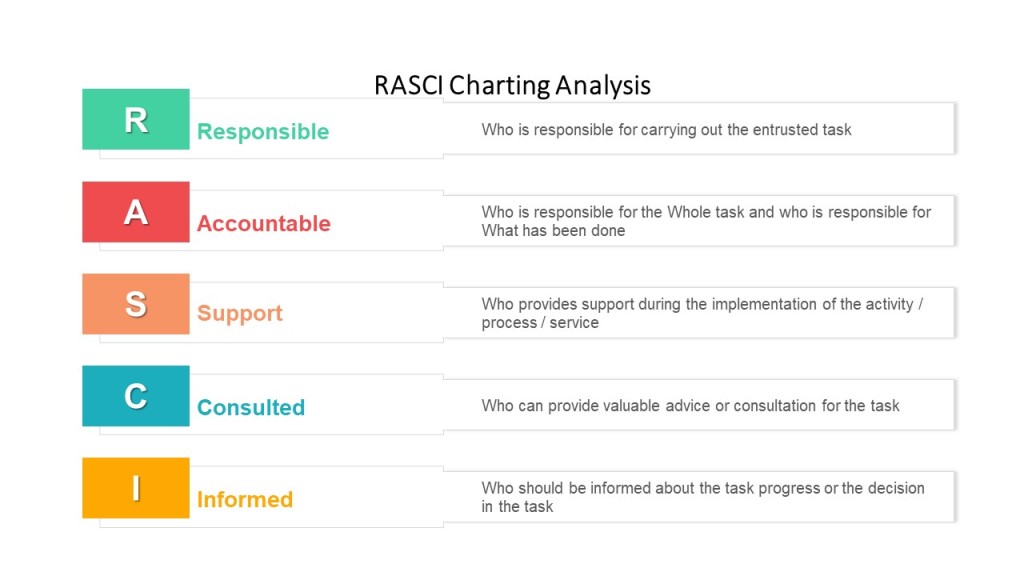
RACI stands for Responsible, Accountable, Consulted, Informed. Each letter in the acronym represents a level of task responsibility.

When to use RACI

RACI’s are best used in procedures as part of the responsibilities section or to start each section in a long procedure.

RACI’s are great tools that can help:

  • Design or re-design processes more efficiently by highlighting decisions
  • Clarify overlapping, redundant, “bottle-necked,” or inconsistent responsibilities
  • Structure and distribute responsibility and authority
  • Establish clear lines of communication
  • Reduce duplication of efforts; pinpoint what can “come off the plate”

RACI definitions

A RACI is a matrix of tasks or deliverables and the roles associated with them.

Each box in the matrix identifies that role’s function in the task

  • Responsible – primary role performing the work
  • Accountable – role primarily responsible for the work getting done (and done correctly)
  • Consulted – roles providing input into the task or deliverable. Consulted means prior to the decision/activity.
  • Informed – roles to be informed of the outcome of the task or deliverable so that they may fulfill execute their role in the process or other process.

I’m a big fan of adding Supporting, and doing a RASCI. Supporting is very helpful in identifying individuals who provide support services, and often capture indirect accountabilities.

RASCI Chart

Key point – only one Responsible and one Accountable role for any task or deliverable.  In some processes, Responsible and Accountable may be the same role

How to create a RACI

Follow these 3 steps, using the RACI chart example below as your guide:

  • Enter all responsibilities in the procedure across the top row.
  • List all procedural steps/tasks, milestones, and decisions down the left column.
  • For each step, assign a responsibility value to each role or person on the team.

Ensure the following:

  • Every task has one Responsible person (and only one!).
  • There’s one (and only one!) Accountable party assigned to each task to allow for clear decision-making.
  • If you have a lot of C and I roles on your matrix, make sure you have an easy and lightweight way to keep them informed in the procedure.

Some points to consider:

  • Have a representative from each of the major functions that participate in the process
  • Reach consensus on all Accountabilities and Responsibilities
  • Consider the emotional aspects of documenting “A”s and “R”s, including job justification
  • Eliminate excessive “C”s and “I”s
  • Consider the organization’s culture

Review the RACI chart vertically to:

  • Avoid under- or over-committing positions or team members
  • Eliminate unnecessary gates and bottlenecks
  • Designate appropriate skill sets

Review the RACI chart horizontally to:

  • Clarify any ambiguous division of labor
  • Ensure adequate continuity across decisions and process steps
  • Ensure accountability and authority to get the job done

Although the RACI is a simple tool, the process of creating it and having it agreed is a political process.

Developing RACI charts surfaces many organizational issues because it confronts the three elements of roles and responsibilities:

  • Role Conception:  what people think their jobs are and how they have been trained to perform them
  • Role Expectation:  what others in the organization think another person’s job is and how it should be carried out
  • Role Behavior:  what people actually do in carrying out their job

Example

  Deviation CreatorArea ResponsibleQAInvestigation TeamSite Head
Take real-time action to minimize and contain the effect of an event RAI
Assemble cross functional team for Triage  RAI
Determine if the event is a deviation  RCAC
Define batch association strategy  CRAI
Define Containment  CRAC
Create Deviation in eQMS in 24 hr  RAI
Gather Data  CA/RCC

Process Architecture

Building a good process requires clear ownership and a deliberate plan. There is a fair amount of work that goes into it, which can be broken down as follows:

   
Category   
   
Sub-category   
   
Basic theme   


Planning   


Process
   
Measurement   
   
Identify,   design, and implement balanced   process metrics and measurement   
   
Implement process   metrics and   measurement reporting mechanisms   
   
Identify and implement KPIs   (And KRIs)    aligned   to process   
   
Evaluate cycle times   and identify potential wastes   
   
Align   level and recognition of people involved in the   process to align with process   


Customer
   
Experience   
   
Process design   with customer interaction trigger mechanisms   
   
Design process in line with customer expectations   
   
Identify customer process performance expectations   
   
Design customer entry points and   define transaction types   


Process Change   
   
Identify incremental and re-engineering process   enhancement opportunities with staff involvement   
   
Design process with minimal process   hand-off’s   
   
Create and execute process improvement plans   
   
Identify process   automation opportunities   
   
Pilot process   design to ensure meeting performance objectives   
   
Governance   
   
Design efficient process with   governance & internal control considerations   
   
Capacity   
   
Conduct demand   and capacity planning   activities   


Staff Training   
   
Develop and conduct staff   training initiatives in line with customer,
   
process, product, and systems expectations   
   
Develop skills   matrix and staff capability requirements in line with process design   
   
Technology   
   
Define technology enablers   
   
Alignment   
   
Align process objectives with organizational goals   
   
Change
   
Management   
   
Engage impacted stakeholders on process changes   


Control   


Process
   
Measurement   
   
Process performance monitoring   
   
Report on process and staff performance with utilization of visual management tools   
   
Obtain continuous customer satisfaction and expectation of process   
   
Active management of process exceptions   
   
Monitor staff performance metrics   


Process Change   
   
Identify process   improvement opportunities on a continuous basis   
   
Focused process hand-off management and   tracking   
   
Capacity   
   
Demand and capacity planning and monitoring   


Governance   
   
Process Change   
   
Process maintenance and continuous update   
   
Define and conform to process documentation standards   
   
Change
   
Management   
   
Process communication and awareness   
   
Staff Training   
   
Utilize process documentation knowledge to facilitate staff training   

Like any activity, it helps to document it. I use a template like this.