Powerpoint Slides

With the current plan to start attending conferences again this spring, I’ve been working a lot on a few different presentations, which means spending a lot of time on PowerPoint presentations.

Microsoft debuted PowerPoint in 1987, and since then, it has been used to present content in meetings, conference rooms, and classrooms. There are a lot of jokes about how bad PowerPoint can be, but if you know a little about its features, PowerPoint can be so much more than mere presentation software. It can be the means for taking audiences on a truly engaging learning adventure as well as a powerful tool that supports presenters by serving as their digital co-facilitator. It just requires some work.

Making presentations for folks outside my organization always gets me thinking of best practices. It helps me concentrate on how the true value of PowerPoint isn’t to serve as an information provider—that’s the role of a presenter. The true value of PowerPoint
is to support you and your presentation.

A presentation is most effective when it is focused and has a coherent narrative. Achieving that starts with defining your objectives and then taking some time to figure out how you’ll meet those objectives. Be intentional in your use of PowerPoint.

Traditional PowerPoint ThinkingIntentional PowerPoint Design Thinking
Every presentation needs slides.My intended presentation outcomes should dictate
the types of visual aids I use (or don’t use).
Every point I make needs a slide.My slides should never compete with me for the audience’s attention; they should support my message.
PowerPoint is synonymous with your presentation.PowerPoint is my co-facilitator.
PowerPoint is linear, and slides appear sequentially.Using triggers and hyperlinks, it’s possible to reveal information dynamically.
Templates make a slide deck look professional.Effective use of slide real estate and visual representation of my message looks professional.
There is a maximum number of words and an ideal font size for most presentations.My audience should be able to read all the words that appear on a slide.
People need a lot of information on technical slides and data-driven presentations.Slides are a visual aid for a presentation; more
detailed information is better offered through
handouts.
There are lots of options for animations and transitions, so they should all be used at some point.Animations and transitions can help focus attention, but there is such a thing as too much.
I can send someone my PowerPoint deck and that should be the equivalent of attending my presentation.Most narratives can be placed in the Notes section and distributed, along with my slides, to paint a complete picture for those not in attendance.
What’s Possible with PowerPoint?

Give a lot of thought to who is your audience. It is always a good idea to understand your audience, but when speaking to folks outside of your What (if anything) does the potential audience already know about your topic? What should the audience be able to do new, different, or better because of the time spent with you?

For example, at the upcoming ISPE Asceptic Conference, my audience understands pharmaceutical quality systems so I can start with the understanding that they understand the basics of my topic. My presentation, as a result, can go to more advanced topics and not have to explain the basics.

A presentation is most effective when it is focused and has a coherent narrative. Achieving that starts with defining your objectives and then taking some time to figure out how you’ll meet those objectives. Taking an hour or two to map out your thoughts and truly think through how best to visually represent your key points can help ensure that your presentation will be tight and focused with a coherent flow.

For each slide:

  1. Slide Purpose/Objective
  2. Sketch/Imagery
  3. Key Points

Things Conferences Should Change

Working on presentations for conferences again really reminds me of all the bad practices conferences continue to use.

  1. Stop Using Templates: It is a common misconception is that using a template makes the slide deck look more professional. Slide templates do help with consistency, but they dramatically reduce the real estate you have to work with on your slide. By the very nature of their structure, these templates encourage a title and bulleted list format. Don’t just believe me, watch this fun video by Will Thalheimer. The more space on a slide that is occupied by professional-looking template designs and logos, the less space remains for inserting powerful imagery, text, facts, or figures.
  2. Leverage Technology to Break Linearity: Most people use PowerPoint in linerar ways, and conference technology builds pretty much make that an inevitability. The technology exists to allow the audience to have some sort of control over the content that’s on display in front of them, and would greatly enhance the conference experience.

Resources

  • Bozarth, J. 2013. Better Than Bullet Points: Creating Engaging e-Learning with PowerPoint. 2nd ed. San Francisco: John Wiley & Sons.
  • Duarte, N. 2010. Resonate: Present Visual Stories that Transform Audiences. Hoboken, NJ: John Wiley & Sons.
  • Duarte, N. 2008. slide:ology: The Art and Science of Creating Great Presentations. Sebastopol, CA: O’Reilly Media.
  • Medina, J. 2014. Brain Rules (2nd ed.). Seattle: Pear Press.
  • Schwertly, S. 2011. How to be a Presentation God: Build, Design and Deliver Presentations that Dominate. Hoboken, NJ: John Wiley & Sons.
  • Vella, J. 2002. Learning to Listen, Learning to Teach: The Power of Dialogue in Educating Adults. San Francisco: Jossey-Bass.
  • Williams, R. 2008. The Non-Designer’s Design Book. 3rd ed. Berkeley, CA: Peachpit Press.
Photo by Pixabay on Pexels.com

Risk, Hazard and Harm

Risk Is….

The combination of the probability of the occurrence of the harm and the severity of that harm.

The effect of uncertainty on objectives

Often characterized by reference to the potential event and consequences or combination of these

Often expressed in terms of a combination of the consequences of an event (including in changes in circumstances) and the associated likelihood of the occurrence


Hazard, harm and risk

HazardHarmRisk
Enabling state that leads to the possibility of harmInjury or damageProbability of harm from a situation triggered by the hazard.
Hazard harm and risk

A hazard is defined in ISO 12100 as “The potential source of harm.” This definition is carried through other ISOs and regulatory guidances. The hazard is what could go wrong, our “What If…”, it is when we start engaging the outcome identification loop to query uncertainty about the future.

Harm are those injuries or damages I should care about.

Every risk assessment is really asking “What could go wrong,” and then answering two questions:

  1. If it did go wrong how bad is it – the Harm
  2. And how likely is it to go wrong – Probability.

Risk is then the combination of those things as a magnitude or priority.

Risk assessment tools break down into two major camps. Those that start with the hazards, asking how something can fail; and those that start with the harms, asking what bad things do we want to avoid.

FDA Device QSR News

On 2 March, FDA’s Device Good Manufacturing Practice Advisory Committee will meet for the first time since 2013 to discuss the agency’s proposal. The meeting materials, and the meeting itself, could offer the first glimpse at the future of the QSR.

I have it on my calendar, and I don’t currently work with medical devices. That has changed before and can change again. More importantly, this QSR update is an important milestone for those who watch the FDA’s take on quality systems and is worth attending.

Blockchain is a costly scam

In the 14 years since permission-less blockchains were created absolutely no one has come up with a single useful thing to do with the technology. The majority of blockchain activity is just about maintaining the blockchain — not about buying or selling things or actually doing anything that has any value to society.

The massive amounts of energy and ewaste is a requirement, maybe even a feature, to the wasteful endeavor of blockchain. Given how that energy waste is a requirement to ensure ‘security’ (for what it is) there’s really no way to fix the problem. And why bother since the whole thing is a tulip-bubble anyways. It exists for speculation.

Blockchain has not offered one feasible solution, and cannot offer a single one, to issues of data integrity or anti-counterfeiting. It isn’t what the technology is designed to do. All it is designed to do is spend a lot of money to drive a speculative bubble,

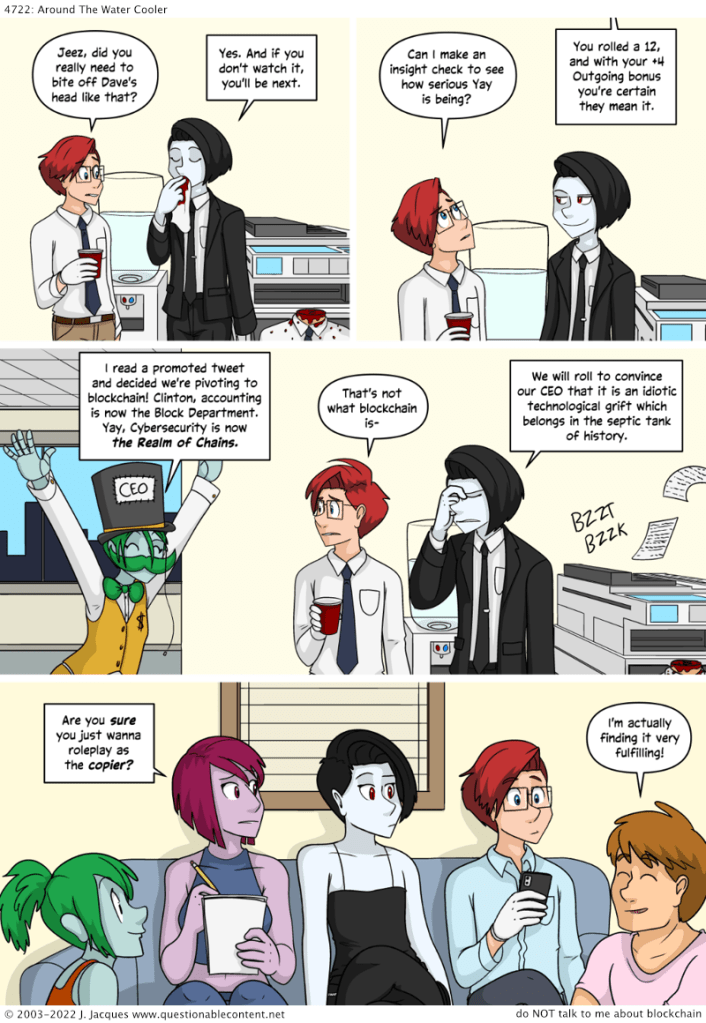
I leave you with a comic, which succinctly summarizes how I feel everytime blockchain comes up in a professional context.

Source https://questionablecontent.net/view.php?comic=4722

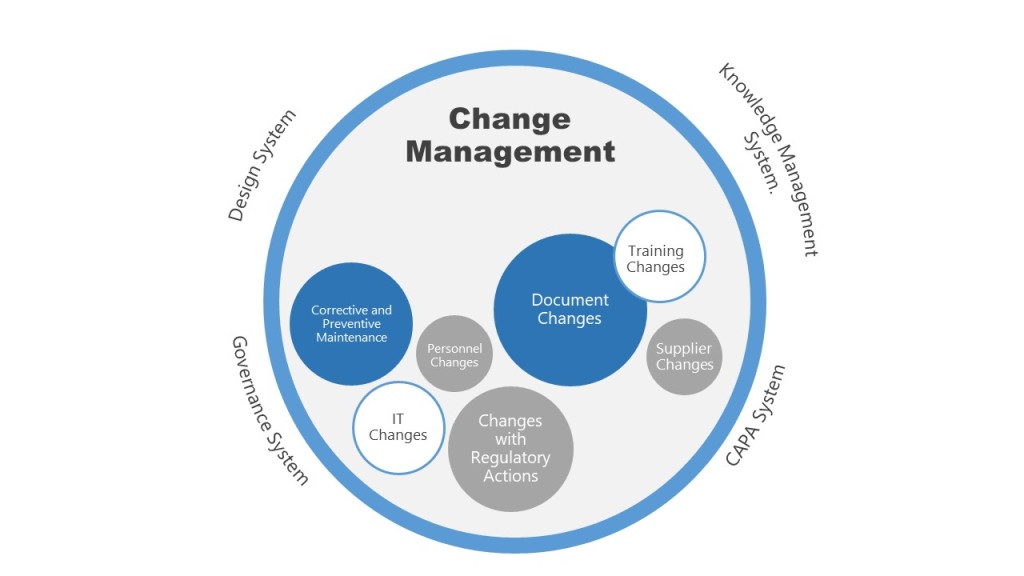
Change Management is Bigger than Change Control So Think Beyond Individual Changes

As a pharmaceutical GXP professional with one foot in the GXP Quality camp and another in the organizational change management camp, I have a few pet peeves. And one of my biggest is whenever someone uses a phrase like “Change management may be known by different terminologies (e.g., change control, change requests, change orders).” That’s a reductionist statement that can really lead to a lot of confusion in an organization.

Change management is the how of change – assess, handle and release. Change control is the what, the execution steps. Change management is a big picture system that looks systematically at people, technology, process, and organization. Change control is the set of mechanisms for controlling the introduction of that change to the organization.

A lot of different systems and processes have change control elements. As many of these processes are supported with specific technologies, it can be very important to think about how they fit together like a puzzle.

This puzzle is usually made up of core requirements. Based on how much the change impacts them decides the rigor of the change control process.

Take for example a pharmaceutical manufacturing site. It is fairly typical to have one process for maintenance, another for IT, another for documents, etc. And then you have a change control system for things that impact established conditions, including validated state and regulatory submissions. Maybe you work at some technological utopia with a single system that manages all changes with all the deliverables, but at most places, you are trying to balance efficiency with effectiveness, and have a real need to avoid unnecessary duplication.

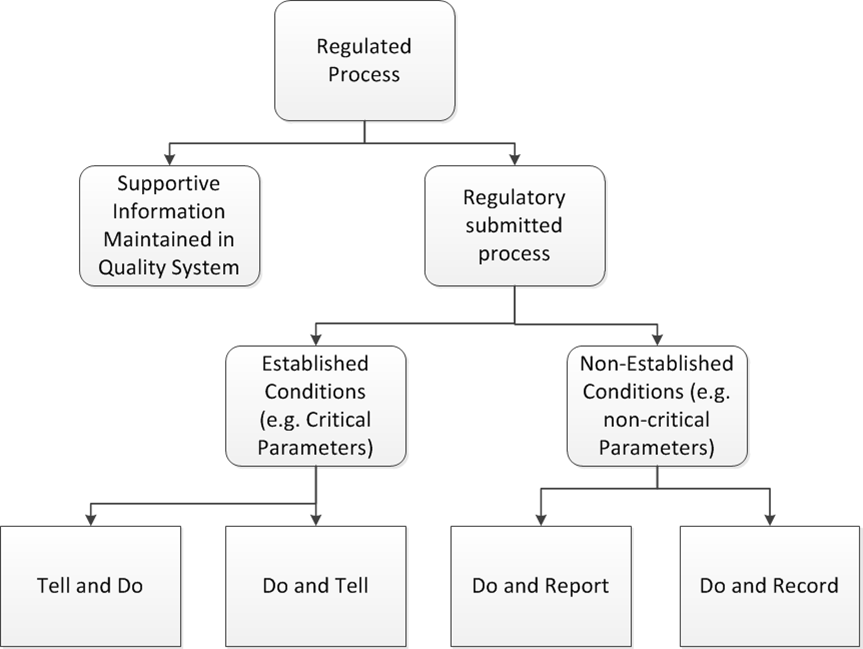
ICH Q12 helps by giving a nice breakdown of the major families of changes.

This helps somewhat, but for the average user it is not very specific. We need to translate it. First, we establish that only one system will be used for regulatory impact (“Tell and Do”, “Do and Tell” “Do and Report” and some of “Do and Record”), then we put the major activities that go into it. This breakdown might look like:

We are utilizing a few major criteria:

  1. Impact of regulated state
  2. Impact of validated state
  3. Risk level of change
  4. Scale of change to the organization

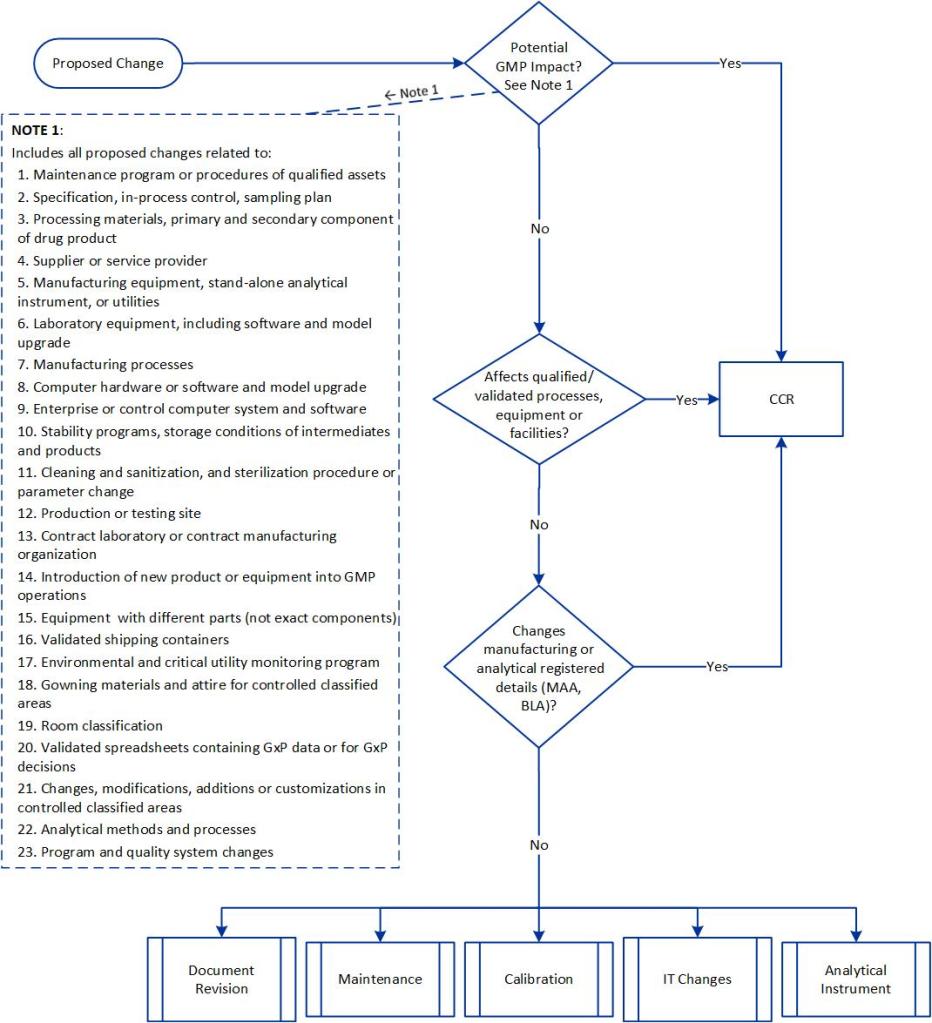
Using these criteria we can even drill down further, for example:

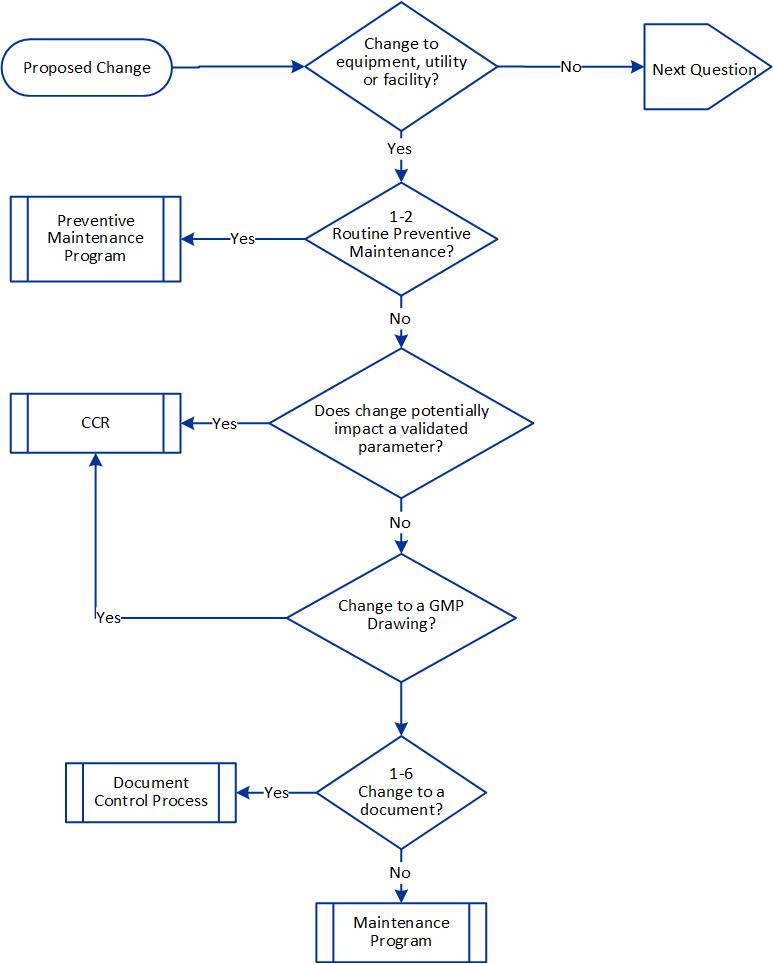
FEU Changes as a flowchart

It is usually a good idea to go down to an even deeper level to help the end-user.

Requires CCR

Does Not Require CCR

Any change that impacts the integrity of controlled classified areas, including all room and equipment surfaces


Changes that do not impact integrity of controlled classified areas by meeting the following criteria:

·     Does not change airflow

·     Does not impact structural integrity and maintains a smooth cleanable surface

·     Does not change means of ingress/egress

·     Does not impact current sampling sites from the Environmental Monitoring Program

·     Materials used are resistant to cleaning agents used in the area as defined in the building specifications

·     Materials are included in disinfectant effectiveness study

Any change that impacts air balancing

Work that is part of routine or preventive maintenance or calibration

Changes to equipment or replacements with a functional equivalent or different component

Changes to equipment with an exact component

Changes to facility floor layout

Instrument calibration including adjustments to field instrumentation

Changes to equipment operating and control parameters

Removal/storage of portable equipment

Changes to equipment, material and personnel ingress, egress and flow procedures

Replacement of system instrument hardware with exact components (hardware)

Changes to room classifications

Engineering studies that do not change the validated state or change anything requiring a CCR per this procedure

Changes that impact the environmental integrity of a room

Alarm set point changes that return to the previous qualified/validated state

Replacement and/or decommissioning of equipment, utilities or facilities

Remediation work (such as mechanical polishing, weld repairs, electro-polishing, filling of pits, de-rouging and chemical cleaning with already approved material)

Alarm set point or classification changes

Addition, modification or deletion to Potable Water, Plant Steam, Chilled Water, Cogeneration System, or pre-treatment reverse-osmosis

Changes in intended use of a room or area

Modification to piping tied to Potable Water, Plant Steam, Chilled Water, Cogeneration System, or pre-treatment reverse-osmosis

Changes to Preventive Maintenance that includes:

·     Decreasing frequency of preventive maintenance (i.e. making less frequent)

·     Change in intent of a preventive maintenance task

·     Adding or removing tasks

Changes to Preventive Maintenance that include:

·     Increasing frequency of preventative maintenance (i.e. making more frequent)

·     Administrative changes

·     Adding clarity to a task (e.g. changing instructions on how to execute a task without altering the intent of the task)

·     Reordering task(s) without changing intent of the task(s)

·     Changes of tools needed to execute a task; room dedicated tools must remain in the designated area

·     Changes to quantity of materials

Changes that decrease the calibration frequency (i.e. make less frequent) for GMP Critical equipment (e.g. directly related to operational control of the product)

·     Changes that increase calibration frequency (i.e. make more frequent) for GMP Non-Critical equipment (e.g. indirectly related to operational control of the product)

Tuning parameter, adjustment to the gain, reset and rate of a PID controller

New or replacement analytical equipment or instruments identified as Category A or Category B-Calibration Only with an exact component

Changes to the calibration frequency of GMP critical equipment (e.g. directly related to operational control of the product)

Changes to manufacturing report properties

Changes to the Environmental Monitoring Program, including addition, deletion or change to a sample location

Changes to alarm paging/notification recipients

Changes to the program for disinfection of a facility or equipment exterior

Creating/modifying individual user accounts

Change of materials of construction or class of polymeric materials (e.g. elastomers, tubing, gaskets and diaphragms)

Add an instrument to the calibration system during pre-commissioning

Changes to hardware or infrastructure associated with a validated system, equipment or utility

Changes to requalification frequency that do not change the intended use or validated state of the equipment or utility

Upgrade of application software or operating system for validated systems, equipment or utility

Corrective changes to an SOP to align it to the validated state

Changes to an SOP to align it to the validated state with impact to one or more regulatory filings

A corrective change to alarm set points to align with the validated state

Creating user groups and/or modifying user group privileges as part of a larger process change associated with validated systems, equipment, or utilities

Addition of a new calibration standard to be used with a new type of instrument at the Alachua site

Creating user groups and/or modifying user group privileges associated with validated systems, equipment, or utilities

Changes to alarm paging/notification recipients

Addition of a new calibration standard to be used with a new type of instrument at the Cambridge and Lexington sites


Modifying a phase prompt or message associated with validated systems, equipment, or utilities


Addition / change of a graphic associated with validated systems, equipment, or utilities


Addition or changing an interlock/permissive trigger


Addition/removal of I/O of validated systems


Changes to the Environmental Monitoring Program, including addition, deletion or change to a sample location


Changes to alarm paging/notification functionality


Historical data collection configuration


Change of equipment and spare parts storage site, including transfers between facilities and transfers to a contracted third party


All of this is change management. We utilize multiple change control mechanisms to manage the change.

Also, don’t forget that change controls can nest. For example a change to the EQMS has IT changes, document changes, training changes, and probably more.